
An Agents API session. OpenAI runs the agent, the commands run in a boxd machine that did not exist when the session started.
How it fits together
The Codex CLI runs inside the machine ascodex exec-server. It opens one outbound WebSocket to OpenAI, receives commands, and returns results. Nothing dials into your network, so the machine can keep every inbound port closed.

Set up the OpenAI side
Two keys, both from the platform dashboard:- An application key for your app, with
api.agents.read,api.agents.write, andapi.responses.write. It creates sessions and sends input. - An environment key from the Agents tab, under Environments, then Keys, with every other permission set to None. It goes into the machine as
CODEX_API_KEY, and connecting environments is all it can do.
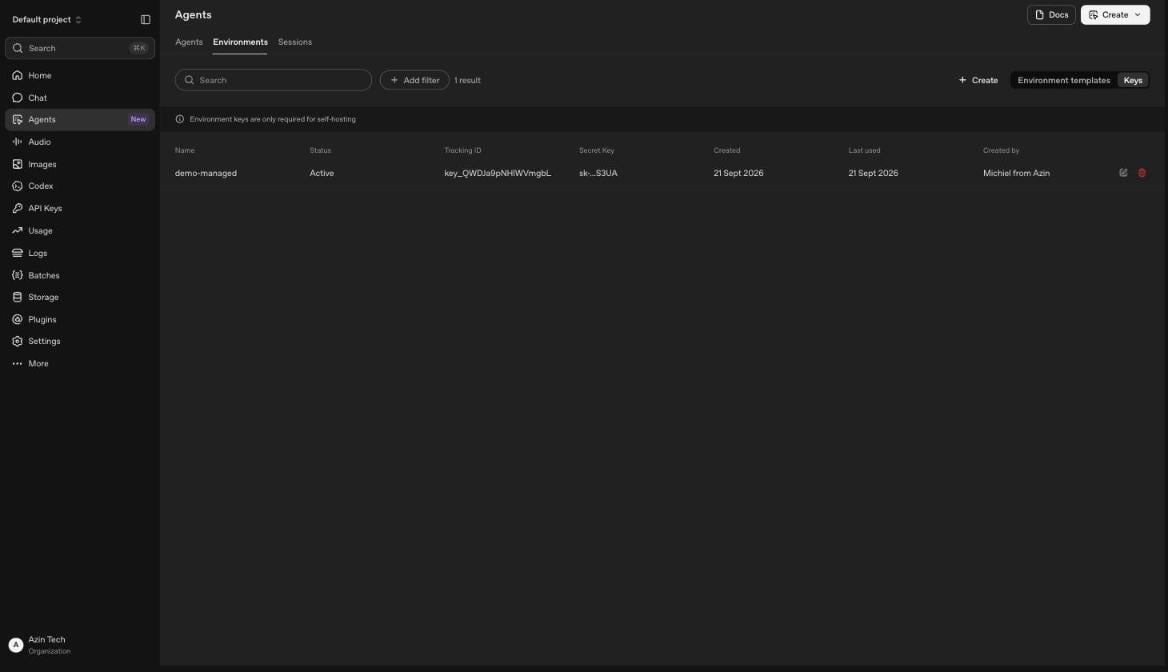
Environment keys in the platform dashboard. Creating one is the one step that lives here, and the dashboard notes that self-hosting is the only thing they are for.
Quickstart, one machine
Create a machine and give it a/workspace. Every boxd machine has the Codex CLI and ripgrep pre-installed:
agent.session.environment.connected the moment the executor registers, and the turn follows. The file appears on the machine.
A connected executor keeps its machine awake. Network traffic in either direction resets the idle clock, and the executor’s WebSocket is outbound traffic. A machine that only waits for inbound work is different: it hibernates after 4 hours without traffic, and the next request wakes it.
--auto-hibernate-timeout=0 turns hibernation off for the machine either way. Auto-suspend is set per machine and is off by default. See Suspend, resume, and hibernate.One machine per session
A single machine means every session shares one filesystem. Giving each session a machine of its own buys three things. Sessions cannot see each other’s files. A session that wrecks its machine wrecks only its own. And each machine sleeps on its own schedule. The shape is an orchestrator that answers OpenAI’s connection requests with a machine.Build the snapshot once
Every session machine is created from a snapshot, so the toolchain is already in place:@openai/codex@alpha with npm. The Codex build pre-installed on boxd machines registers with the current API, and the builder machine is the place to pin a different one.
Run the orchestrator
Three webhooks drive it.agent.session.action_required with an environment_connection action means a session needs its machine, so the orchestrator creates or wakes one and starts the executor. agent.session.idle starts a grace period, after which it stops the executor and pauses the machine. agent.session.failed deletes the machine. Put it on its own boxd machine, where the SDK authenticates automatically with no key to manage.
- TypeScript
- Python
orchestrator.ts
https://codex-orchestrator.boxd.sh/webhook as a webhook endpoint in your project’s settings, subscribed to agent.session.action_required, agent.session.idle, and agent.session.failed. Put the whsec_ secret it shows next to the two keys, in a .env beside the orchestrator file:
.env
api.agents.read is enough for it. Then deploy. The machine already has an HTTPS domain, so there is no TLS to arrange:
204 in ~/orchestrator.log. Anything unsigned gets a 400.
Your application now needs nothing from boxd. It creates a session and sends input, and the machine appears:
Pause between turns
Thirty seconds after a session goes idle, the orchestrator checks that nothing new has arrived, stops the executor, and pauses the machine. That takes it tostandby, where it keeps its memory and processes and bills no vCPU. The orchestrator turns auto-hibernate off on session machines, so a machine stays on standby until its next turn.
Stopping the executor first is what makes this work. OpenAI sees the environment go offline, so the next input produces a connection request instead of a tool call into a machine on standby. The orchestrator wakes the machine, starts a new executor, and the turn proceeds. The agent finds /workspace as it left it, dependencies installed and caches warm. The executor itself holds nothing worth keeping, since the session lives at OpenAI.
The machine lives until the session fails, or until you delete it. Deleting a session fires no webhook, so delete the session and its machine together from your app, or sweep the
agent- machines whose session no longer exists.
Your app drives both
Without a webhook, your app can do the orchestrator’s job itself, because it knows when it sends input. Wake the machine and start the executor before the turn, stop the executor and pause after it.ensure_machine and start_executor are the ones from the orchestrator above:
Credentials the agent can use but never read
The environment key is the one credential the machine holds, and connecting is all it can do. Everything else the agent needs, an API key for a service it calls or a token for a private registry, can stay out of the machine entirely. Bind a secret to the hosts it may be sent to, and the machine only ever holds a placeholder:api.stripe.com on the way out. Inside the machine, env, shell history, and the agent’s own transcript contain nothing but an opaque bxds_… string. A prompt injection that talks the agent into printing every secret it can find gets placeholders. Set it once with scope all and every session machine in the organization carries it. An isolated machine receives the variables in its scope through exec sessions, and exec is exactly how the orchestrator starts the executor.
Pair it with a per-machine egress allowlist so the machine can only reach the hosts you name. A machine created from a snapshot starts unrestricted, so set the list in ensure_machine right after create. Keep api.openai.com and codex-cloud-environments.chatgpt.com on it, the two hosts the executor needs:
Files and repositories
Self-hosted sessions take noenvironment.files at creation and publish nothing through OpenAI’s Artifacts API, since OpenAI has no container to mount them into. Two boxd answers, depending on whether the data is shared or per-session:
Shared across every session. Bake it into the snapshot. Clone the repo, install the dependencies, warm the caches, put skills where capability_directories will find them, then save. Every session starts with it, with nothing to install or download first.
Per session. Copy it in from the orchestrator before starting the executor, using the session’s own metadata to decide what. Your app sets the metadata when it creates the session:
connect, so the metadata is right there:
/workspace, and the orchestrator reads the file out with machines.files.download once the turn ends.
Parallel exploration
A fork copies a running machine’s disk, memory, and processes in under 200ms. Fork a session machine several times mid-task and each copy continues from the same live state, so an agent can try several approaches at once and keep the one that works:What you own
Commands and their output still travel to OpenAI, because the model has to see them. Everything else stays on your machine.
FAQ
Does the machine need a public endpoint?
Does the machine need a public endpoint?
No. The executor connects outbound over a WebSocket. Only the orchestrator needs an inbound URL, and only if you choose the webhook path. Every machine already has one at
name.boxd.sh.What happens if the machine dies mid-turn?
What happens if the machine dies mid-turn?
The command in flight fails, and the turn completes with that failure visible in the agent’s answer. OpenAI does not request a connection mid-turn. The next input does, and the orchestrator creates a fresh machine from the snapshot under the same name, since the old one is gone. Files written since the snapshot went with it.
Why can't I delete a session that is waiting for its environment?
Why can't I delete a session that is waiting for its environment?
OpenAI refuses deletion while a session has a required action. Connect an executor for a few seconds, the action clears and the session goes idle, then delete it.
Which model should the agent use?
Which model should the agent use?
Whatever you pass in
agent. The environment has nothing to do with model choice, so a self-hosted sandbox costs the same per token as a hosted one.