
*.boxd.sh URL that gets posted on the PR. Reviewers click it and land on a full Linux machine, so two reviewers can poke at two different PRs without stepping on each other’s writes. Close the PR and the machine is deleted.
Here GitHub Actions starts the preview. You can also skip GitHub Actions and run it on boxd, which is faster.
How it works
You maintain a snapshot of your app: a machine with your app installed and running, re-saved on every push to main so it always reflects your latest code. That guide is the prerequisite for this page. On every PR, a script creates a machine from the latest snapshot, named for the PR:Save a snapshot, then start a machine from it. Booted in 4ms.
https://myapp-pr-482.boxd.sh. On new pushes the machine is recreated from the latest snapshot, and because the name is reused, the URL stays stable across the PR’s whole life. On close, one command removes it.
The scripts
Two small scripts cover the full lifecycle. The recommended way to run them is through the TypeScript or Python SDK, which reads aBOXD_API_KEY from the environment and handles authentication for you.
Bring a preview up, or refresh it after a push:
- TypeScript
- Python
preview-up.ts
- TypeScript
- Python
preview-down.ts
npm ci && sudo systemctl restart myapp) for whatever your stack needs. An API key from boxd auth keys create acts as you, so the preview is your private machine: with Git connected, the git fetch inside it works against private repos with nothing extra to configure. On a shared machine, git uses the GitHub App instead.
Wire it into CI
Store the key as a repo secret:.github/workflows/preview.yml
Or skip GitHub Actions
The fastest setup runs on boxd itself. An automation receives the pull request event through the boxd GitHub App and runs the same steps, so no runner has to start first and there is no API key to store.Patterns
A stable URL per PR
The machine is named for the PR number, so each PR keepshttps://myapp-pr-<n>.boxd.sh across every push. That makes it a steady target for screenshot diffs and Playwright runs, and reviewers keep refreshing the same link.
A preview asks for a bot protection check before it wakes, and with the On mode while it runs too. Reviewers pass it in their browser, but headless Playwright runs and other CI jobs may not. Turn it off for previews that automated jobs hit with
boxd machine config set myapp-pr-482 bot-protection off.Preview data without a staging database
A preview needs data, and there are two ways to give it its own copy. Keep the data on the machine. Run a local database on the source machine before you snapshot it. A snapshot and a fork copy the disk, so every preview starts with that data and its writes stay inside that one preview. The next recreate resets it. Branch a hosted database. If your data lives in a hosted Postgres that can branch, such as Neon, create a database branch for each pull request and pass its connection string to the preview machine. The branch is a copy-on-write copy of your data, and you delete it with the machine when the pull request closes.Example: a Neon branch per pull request

Example: a Neon branch per pull request

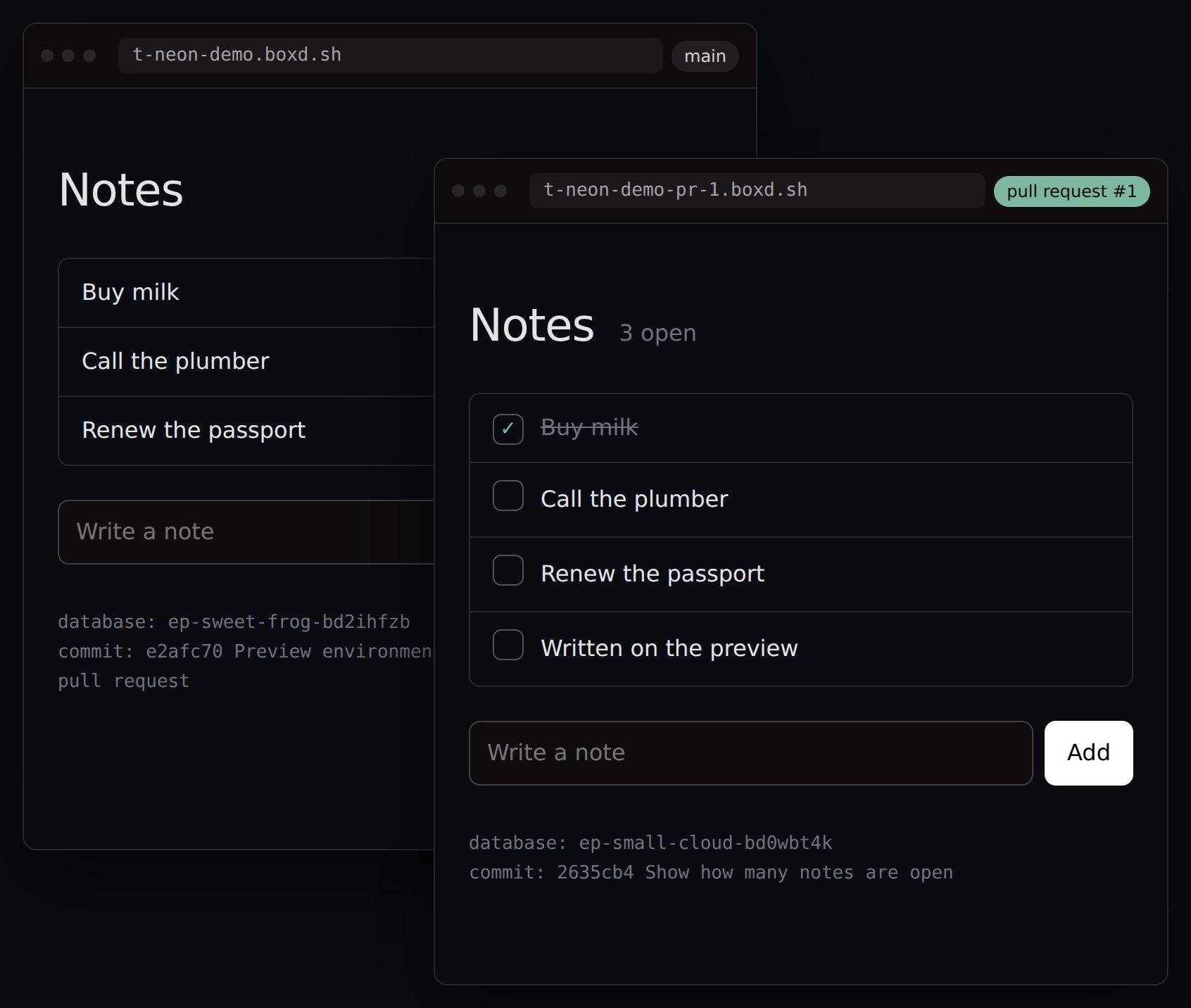
From a test run. Behind: the app on main. In front: the preview of pull request 1 on its own Neon branch. The PR's migration added the checkboxes, and the last note exists only on the preview.
preview-up.ts creates a Neon branch named myapp-pr-<number> and creates the machine with that branch as its DATABASE_URL. On a push it keeps the branch, so a reviewer’s rows survive the redeploy. On close, preview-down.ts deletes the machine and the branch.You need a Neon project with one database and one role, a Neon API key stored as the NEON_API_KEY secret, and the project ID as the NEON_PROJECT_ID variable. Add both SDKs with your app’s package manager: npm install -D @boxd-sh/sdk @neon/sdk. The example app reads DATABASE_URL from ~/myapp/.env and runs npm run migrate.parentId to createAndConnect. Point the snapshot machine itself at a development branch, not production.More than a URL
Each preview is a full machine you own.ssh myapp-pr-482.boxd gets you a shell in the exact environment the reviewer is looking at, and boxd machine exec lets other jobs run tests against it.
Previews sleep when not in use
The script sets a 5-minute auto-suspend and a 30-minute auto-hibernate, so an idle preview goes to standby and then hibernates. The next click on its link wakes it, and only that one.Ten previews, all hibernated. Opening one wakes only that one.
FAQ
What does a preview cost while nobody is clicking it?
What does a preview cost while nobody is clicking it?
Very little, on two levels. The 5-minute auto-suspend puts an idle preview on standby, where it bills for memory and disk but no vCPU, and clicking the link resumes it in sub-millisecond time. The 30-minute auto-hibernate then moves it to disk, where it bills for disk only, and the next click wakes it in about 85ms. A PR sitting open over the weekend costs effectively nothing.
What happens if 5 PRs get previews at once?
What happens if 5 PRs get previews at once?
You get 5 machines, one per PR. The default cap is 50 machines per organization, extendable on request, and the source machine counts toward it too. Hibernated previews count as well.
How fresh is the code under the branch?
How fresh is the code under the branch?
The preview is created from the latest snapshot, which your refresh workflow re-saves on every push to main. The PR branch is then checked out on top, so the diff against main is exactly what the rebuild has to cover.
Why recreate instead of reusing the machine on every push?
Why recreate instead of reusing the machine on every push?
Recreating from the snapshot gives every push a clean, known starting state for the price of one boot, and the reused name keeps the URL stable. If your rebuild is expensive and pushes are frequent, reuse the machine and run the checkout step alone.