> ## Documentation Index
> Fetch the complete documentation index at: https://docs.boxd.sh/llms.txt
> Use this file to discover all available pages before exploring further.
# OpenAI Agents API
> OpenAI runs the Codex harness. Every command runs inside a boxd machine you control.
The [Agents API](https://developers.openai.com/api/docs/guides/agents-api/overview) splits an agent in two. OpenAI hosts the model, the Codex harness, session state, and context compaction. A [self-hosted environment](https://developers.openai.com/api/docs/guides/agents-api/environments/self-hosted) moves the other half to you, so every shell command, file read, file write, and local MCP call executes on infrastructure you own.
Point that half at boxd and each session gets a full Linux VM with its own kernel, root, a persistent disk, and an HTTPS domain. The machine boots in milliseconds, freezes between turns, and wakes with its filesystem exactly as the last turn left it.
## How it fits together
The Codex CLI runs inside the machine as `codex exec-server`. It opens one outbound WebSocket to OpenAI, receives commands, and returns results. Nothing dials into your network, so the machine can keep every inbound port closed.
 Three pieces:
| Piece | What it is |
| --------------- | ------------------------------------------------------------------------------------------------------------------------------------------------------------------------ |
| **Agent** | The model, instructions, and tools. Passed inline when you create a session, or stored once and referenced by id. |
| **Environment** | Where a session runs. Set `type: self_hosted` and OpenAI returns an environment id and a connection URL instead of provisioning a container. Every session gets its own. |
| **Executor** | The Codex CLI, running `codex exec-server` in a boxd machine, connected to one session's environment. |
## Set up the OpenAI side
Two keys, both from the [platform dashboard](https://platform.openai.com):
* An **application key** for your app, with `api.agents.read`, `api.agents.write`, and `api.responses.write`. It creates sessions and sends input.
* An **environment key** from the [Agents tab](https://platform.openai.com/agents?tab=environments\&environment_view=keys), under Environments, then Keys, with every other permission set to None. It goes into the machine as `CODEX_API_KEY`, and connecting environments is all it can do.
Both must belong to the same organization, project, and user or service account.
Three pieces:
| Piece | What it is |
| --------------- | ------------------------------------------------------------------------------------------------------------------------------------------------------------------------ |
| **Agent** | The model, instructions, and tools. Passed inline when you create a session, or stored once and referenced by id. |
| **Environment** | Where a session runs. Set `type: self_hosted` and OpenAI returns an environment id and a connection URL instead of provisioning a container. Every session gets its own. |
| **Executor** | The Codex CLI, running `codex exec-server` in a boxd machine, connected to one session's environment. |
## Set up the OpenAI side
Two keys, both from the [platform dashboard](https://platform.openai.com):
* An **application key** for your app, with `api.agents.read`, `api.agents.write`, and `api.responses.write`. It creates sessions and sends input.
* An **environment key** from the [Agents tab](https://platform.openai.com/agents?tab=environments\&environment_view=keys), under Environments, then Keys, with every other permission set to None. It goes into the machine as `CODEX_API_KEY`, and connecting environments is all it can do.
Both must belong to the same organization, project, and user or service account.
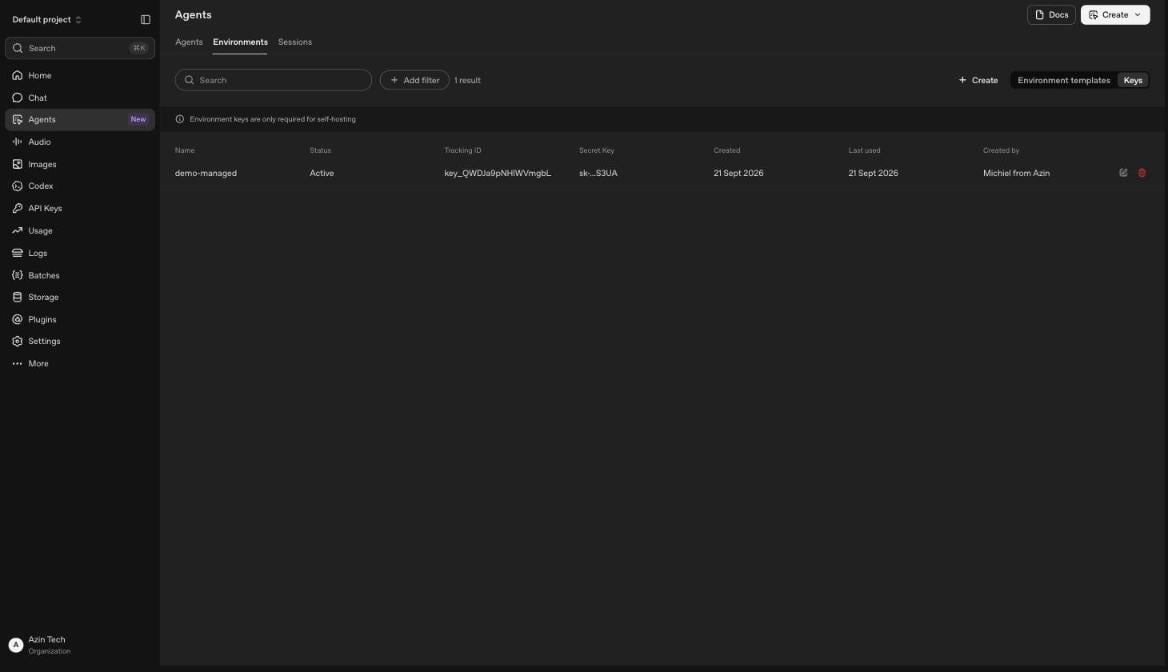 Keep the application key off any machine that runs the agent's commands. The environment key is enough for the executor, and it grants nothing beyond connecting.
## Quickstart, one machine
Create a machine and give it a `/workspace`. The boxd image already ships the Codex CLI and ripgrep:
```bash theme={"theme":"github-dark"}
boxd machine new codex-worker --auto-hibernate-timeout=0
boxd machine exec codex-worker -- 'sudo mkdir -p /workspace && sudo chown boxd:boxd /workspace'
```
Create a session from anywhere. OpenAI answers with the environment id and the URL the executor connects to:
```python theme={"theme":"github-dark"}
from openai import OpenAI
client = OpenAI()
session = client.beta.agents.sessions.create(
agent={"model": "gpt-6-astra", "instructions": "You are a coding agent. Work in /workspace."},
environment={"type": "self_hosted", "workspace_directory": "/workspace"},
)
print(session.id, session.environment.id, session.environment.remote_url)
```
Start the executor in the machine with the environment key passed in on the command:
```bash theme={"theme":"github-dark"}
boxd machine exec codex-worker -e CODEX_API_KEY="sk-proj-..." -- \
'cd /workspace && nohup codex exec-server --remote "" --environment-id "" > ~/executor.log 2>&1 &'
```
Now send the first turn:
```python theme={"theme":"github-dark"}
with client.beta.agents.sessions.stream(
session.id, input="create /workspace/hello.txt with a greeting, then read it back"
) as events:
for event in events:
if event.type == "agent.session.turn.output_text.delta":
print(event.delta, end="")
```
The stream reports `agent.session.environment.connected` the moment the executor registers, and the turn follows. The file appears on the machine.
Set `--auto-hibernate-timeout=0` on any machine running an executor, and `--auto-suspend-timeout=0` if your org turns auto-suspend on by default. The idle timers watch inbound traffic, and the executor's WebSocket is outbound, so a busy executor still looks idle. See [Suspend, resume, and hibernate](/guides/suspend-resume).
## One machine per session
A single machine means every session shares one filesystem. Giving each session a machine of its own buys three things. Sessions cannot see each other's files. A session that wrecks its machine wrecks only its own. And each machine sleeps on its own schedule.
The shape is an orchestrator that answers OpenAI's connection requests with a machine.
### Build the image once
Every session machine boots from a [snapshot](/guides/snapshots), so the toolchain is already in place:
```bash theme={"theme":"github-dark"}
boxd machine new codex-worker-builder
boxd machine exec codex-worker-builder -- 'sudo mkdir -p /workspace && sudo chown boxd:boxd /workspace'
# Add whatever every session should start with: a repo clone, a toolchain, skills under /workspace/skills.
boxd snapshots save codex-worker-builder codex-worker
boxd machine remove codex-worker-builder -y
```
A machine created from this snapshot is ready in milliseconds, memory and all. OpenAI's own setup installs `@openai/codex@alpha` with npm. The build on the boxd image registers with the current API, and the builder is the place to pin a different one.
### Run the orchestrator
Three webhooks drive it. `agent.session.action_required` with an `environment_connection` action means a session needs its machine, so the orchestrator boots or wakes one and starts the executor. `agent.session.idle` starts a grace period, after which it stops the executor and pauses the machine. `agent.session.failed` deletes the machine. Put it on its own boxd machine, where the SDK authenticates automatically with no key to manage.
```python theme={"theme":"github-dark"}
import asyncio, json, os, re, shlex
from collections import defaultdict
from boxd import AsyncBoxd, NotFoundError
from fastapi import FastAPI, Request, Response
from openai import AsyncOpenAI, InvalidWebhookSignatureError
EXECUTOR_KEY = os.environ["OPENAI_EXECUTOR_API_KEY"]
client = AsyncOpenAI(webhook_secret=os.environ["OPENAI_WEBHOOK_SECRET"])
boxd = AsyncBoxd()
app = FastAPI()
inflight: set[asyncio.Task] = set()
pending_pause: dict[str, asyncio.Task] = {}
locks = defaultdict(asyncio.Lock) # one session's machine changes state one step at a time
def machine_name(session_id: str) -> str:
return "agent-" + re.sub(r"[^a-z0-9-]", "-", session_id.lower())
async def ensure_machine(session_id: str) -> str:
name = machine_name(session_id)
try:
machine = await boxd.machines.get(name)
except NotFoundError:
machine = await boxd.machines.create(name, from_snapshot="codex-worker", isolated=True)
await boxd.machines.set_auto_hibernate_timeout(machine.id, 0)
if machine.status == "suspended":
await boxd.machines.resume(machine.id)
await boxd.machines.wait_until_ready(machine.id)
return machine.id
async def start_executor(machine_id: str, environment) -> None:
executor = shlex.join(["codex", "exec-server",
"--remote", environment.remote_url, "--environment-id", environment.id])
script = f"pkill -x codex; cd /workspace && exec flock -w 15 /tmp/codex-executor.lock {executor}"
# env= is a K=V prefix on the command line. It reaches this sh, and the executor inherits it.
await boxd.machines.exec(
machine_id, f"nohup sh -c {shlex.quote(script)} > /tmp/codex-executor.log 2>&1 &",
env={"CODEX_API_KEY": EXECUTOR_KEY},
)
async def connect(session_id: str) -> None:
cancel_pause(session_id)
async with locks[session_id]:
session = await client.beta.agents.sessions.retrieve(session_id)
if not any(a.type == "environment_connection" for a in session.required_actions or []):
return # resolved already, a duplicate delivery
machine_id = await ensure_machine(session_id)
await start_executor(machine_id, session.environment)
async def pause_later(session_id: str) -> None:
await asyncio.sleep(30)
async with locks[session_id]:
session = await client.beta.agents.sessions.retrieve(session_id)
if session.status != "idle" or session.required_actions:
return # a turn started or input is waiting
machine = await boxd.machines.get(machine_name(session_id))
await boxd.machines.exec(machine.id, "pkill -x codex") # OpenAI sees the environment go offline
await boxd.machines.pause(machine.id)
def cancel_pause(session_id: str) -> None:
if task := pending_pause.pop(session_id, None):
task.cancel()
async def remove_machine(session_id: str) -> None:
cancel_pause(session_id)
try:
await boxd.machines.delete(machine_name(session_id))
except NotFoundError:
pass
def spawn(coro) -> None:
task = asyncio.create_task(coro)
inflight.add(task)
task.add_done_callback(inflight.discard)
@app.post("/webhook")
async def webhook(request: Request) -> Response:
payload = await request.body()
try:
client.webhooks.verify_signature(payload=payload, headers=request.headers)
except (InvalidWebhookSignatureError, ValueError):
return Response("invalid signature", status_code=400)
event = json.loads(payload)
session_id = event["data"]["id"]
if event["type"] == "agent.session.action_required":
if event["data"]["required_action"]["type"] == "environment_connection":
spawn(connect(session_id)) # ack now, the boot outlives the delivery
elif event["type"] == "agent.session.idle":
cancel_pause(session_id)
pending_pause[session_id] = asyncio.create_task(pause_later(session_id))
elif event["type"] == "agent.session.failed":
spawn(remove_machine(session_id))
return Response(status_code=204)
```
```typescript theme={"theme":"github-dark"}
import http from "node:http";
import OpenAI from "openai";
import { Boxd, NotFoundError } from "@boxd-sh/sdk";
const EXECUTOR_KEY = process.env.OPENAI_EXECUTOR_API_KEY!;
const client = new OpenAI({ webhookSecret: process.env.OPENAI_WEBHOOK_SECRET });
const boxd = new Boxd();
const pendingPause = new Map();
const chains = new Map>();
const machineName = (sessionId: string) =>
"agent-" + sessionId.toLowerCase().replace(/[^a-z0-9-]/g, "-");
const quote = (s: string) => `'${s.replace(/'/g, `'\\''`)}'`;
// One session's machine changes state one step at a time.
function locked(sessionId: string, fn: () => Promise): Promise {
const next = (chains.get(sessionId) ?? Promise.resolve()).then(fn, fn);
chains.set(sessionId, next.catch(() => {}));
return next;
}
async function ensureMachine(sessionId: string): Promise {
const name = machineName(sessionId);
let machine;
try {
machine = await boxd.machines.get(name);
} catch (e) {
if (!(e instanceof NotFoundError)) throw e;
machine = await boxd.machines.create({ name, fromSnapshot: "codex-worker", isolated: true });
await boxd.machines.setAutoHibernateTimeout(machine.id, 0);
}
if (machine.status === "suspended") await boxd.machines.resume(machine.id);
await boxd.machines.waitUntilReady(machine.id);
return machine.id;
}
async function startExecutor(machineId: string, environment: { id: string; remote_url: string }) {
const executor = ["codex", "exec-server", "--remote", environment.remote_url, "--environment-id", environment.id]
.map(quote).join(" ");
const script = `pkill -x codex; cd /workspace && exec flock -w 15 /tmp/codex-executor.lock ${executor}`;
// env is a K=V prefix on the command line. It reaches this sh, and the executor inherits it.
await boxd.machines.exec(machineId, {
command: `nohup sh -c ${quote(script)} > /tmp/codex-executor.log 2>&1 &`,
env: { CODEX_API_KEY: EXECUTOR_KEY },
});
}
async function connect(sessionId: string) {
cancelPause(sessionId);
await locked(sessionId, async () => {
const session = await client.beta.agents.sessions.retrieve(sessionId);
if (session.environment.type !== "self_hosted") return;
if (!session.required_actions?.some((a) => a.type === "environment_connection")) return; // a duplicate delivery
await startExecutor(await ensureMachine(sessionId), session.environment);
});
}
async function pauseNow(sessionId: string) {
await locked(sessionId, async () => {
const session = await client.beta.agents.sessions.retrieve(sessionId);
if (session.status !== "idle" || session.required_actions?.length) return; // a turn started or input is waiting
const machine = await boxd.machines.get(machineName(sessionId));
await boxd.machines.exec(machine.id, { command: "pkill -x codex" }); // OpenAI sees the environment go offline
await boxd.machines.pause(machine.id);
});
}
function cancelPause(sessionId: string) {
clearTimeout(pendingPause.get(sessionId));
pendingPause.delete(sessionId);
}
async function removeMachine(sessionId: string) {
cancelPause(sessionId);
try {
await boxd.machines.delete(machineName(sessionId));
} catch (e) {
if (!(e instanceof NotFoundError)) throw e;
}
}
http.createServer(async (req, res) => {
const body = await new Promise((resolve) => {
let d = ""; req.on("data", (c) => (d += c)); req.on("end", () => resolve(d));
});
try {
await client.webhooks.verifySignature(body, req.headers as Record);
} catch {
res.writeHead(400); return res.end("invalid signature");
}
const event = JSON.parse(body);
const sessionId: string = event.data.id;
if (event.type === "agent.session.action_required") {
if (event.data.required_action.type === "environment_connection") {
void connect(sessionId).catch(console.error); // ack now, the boot outlives the delivery
}
} else if (event.type === "agent.session.idle") {
cancelPause(sessionId);
pendingPause.set(sessionId, setTimeout(() => void pauseNow(sessionId).catch(console.error), 30_000));
} else if (event.type === "agent.session.failed") {
void removeMachine(sessionId).catch(console.error);
}
res.writeHead(204); res.end();
}).listen(8000, "0.0.0.0");
```
Create the orchestrator machine first, so the URL you register resolves:
```bash theme={"theme":"github-dark"}
boxd machine new codex-orchestrator --auto-hibernate-timeout=0
```
Register `https://codex-orchestrator.boxd.sh/webhook` as a [webhook endpoint](https://developers.openai.com/api/docs/guides/webhooks#creating-webhook-endpoints) in your project's settings, subscribed to `agent.session.action_required`, `agent.session.idle`, and `agent.session.failed`. Put the `whsec_` secret it shows next to the two keys, in a `.env` beside your `orchestrator.py` or `orchestrator.ts`:
```bash theme={"theme":"github-dark"}
OPENAI_API_KEY=sk-proj-...
OPENAI_EXECUTOR_API_KEY=sk-proj-...
OPENAI_WEBHOOK_SECRET=whsec_...
```
The application key here only retrieves sessions, so `api.agents.read` is enough for it. Then deploy. The machine already has an HTTPS domain, so there is no TLS to arrange:
```bash Python theme={"theme":"github-dark"}
boxd machine exec codex-orchestrator -- 'mkdir -p ~/codex && cd ~/codex && uv venv && uv pip install openai boxd fastapi uvicorn'
boxd machine cp orchestrator.py codex-orchestrator:codex/orchestrator.py
boxd env push codex-orchestrator --file .env --dest '~/codex/.env'
boxd machine exec codex-orchestrator -- 'cd ~/codex && set -a && . ./.env && set +a && nohup .venv/bin/uvicorn orchestrator:app --host 0.0.0.0 --port 8000 > ~/orchestrator.log 2>&1 &'
```
```bash TypeScript theme={"theme":"github-dark"}
boxd machine exec codex-orchestrator -- 'mkdir -p ~/codex && cd ~/codex && npm init -y >/dev/null && npm install openai @boxd-sh/sdk tsx'
boxd machine cp orchestrator.ts codex-orchestrator:codex/orchestrator.ts
boxd env push codex-orchestrator --file .env --dest '~/codex/.env'
boxd machine exec codex-orchestrator -- 'cd ~/codex && set -a && . ./.env && set +a && nohup npx tsx orchestrator.ts > ~/orchestrator.log 2>&1 &'
```
A signed delivery gets a `204` in `~/orchestrator.log`. Anything unsigned gets a `400`.
Your application now needs nothing from boxd. It creates a session and sends input, and the machine appears:
```python Python theme={"theme":"github-dark"}
from openai import OpenAI
client = OpenAI(timeout=600) # OpenAI waits up to five minutes for the executor
session = client.beta.agents.sessions.create(
agent={"model": "gpt-6-astra", "instructions": "You are a coding agent. Work in /workspace."},
environment={"type": "self_hosted", "workspace_directory": "/workspace"},
)
with client.beta.agents.sessions.stream(session.id, input="clone the repo and run the tests") as events:
for event in events:
if event.type == "agent.session.turn.output_text.delta":
print(event.delta, end="")
```
```typescript TypeScript theme={"theme":"github-dark"}
import OpenAI from "openai";
const client = new OpenAI({ timeout: 600_000 }); // OpenAI waits up to five minutes for the executor
const session = await client.beta.agents.sessions.create({
agent: { model: "gpt-6-astra", instructions: "You are a coding agent. Work in /workspace." },
environment: { type: "self_hosted", workspace_directory: "/workspace" },
});
const stream = await client.beta.agents.sessions.stream(session.id, { input: "clone the repo and run the tests" });
for await (const event of stream) {
if (event.type === "agent.session.turn.output_text.delta") process.stdout.write(event.delta);
}
```
### Pause between turns
Thirty seconds after a session goes idle, the orchestrator checks that nothing new has arrived, stops the executor, and pauses the machine. That takes it to `standby`, where it holds its memory and processes and costs near nothing.
Stopping the executor first is the whole trick. OpenAI sees the environment go offline, so the next input produces a connection request instead of a tool call into a frozen socket. The orchestrator wakes the machine, starts a new executor, and the turn proceeds. The agent finds `/workspace` as it left it, dependencies installed and caches warm. The executor itself holds nothing worth keeping, since the session lives at OpenAI.
| Machine state when input arrives | Time to a finished one-command turn |
| ---------------------------------- | ----------------------------------- |
| Running | 13 s |
| Paused | 20 s |
| None yet, booted from the snapshot | 30 s |
The machine lives until the session fails, or until you remove it. Deleting a session fires no webhook, so delete the session and its machine together from your app, or sweep the `agent-` machines whose session no longer exists.
## Your app drives both
Without a webhook, your app can do the orchestrator's job itself, because it knows when it sends input. Wake the machine and start the executor before the turn, stop the executor and pause after it. `ensure_machine` and `start_executor` are the ones from the orchestrator above:
```python theme={"theme":"github-dark"}
from openai import AsyncOpenAI
async def turn(session_id: str | None, prompt: str) -> None:
async with AsyncOpenAI(timeout=600) as client:
if session_id:
session = await client.beta.agents.sessions.retrieve(session_id)
else:
session = await client.beta.agents.sessions.create(
agent={"model": "gpt-6-astra", "instructions": "You are a coding agent. Work in /workspace."},
environment={"type": "self_hosted", "workspace_directory": "/workspace"},
)
machine_id = await ensure_machine(session.id)
await start_executor(machine_id, session.environment)
async with client.beta.agents.sessions.stream(session.id, input=prompt) as events:
async for event in events:
if event.type == "agent.session.turn.output_text.delta":
print(event.delta, end="", flush=True)
await boxd.machines.exec(machine_id, "pkill -x codex")
await boxd.machines.pause(machine_id)
```
Same machines, same snapshot, same pause between turns, with one process fewer to run. Use it when one application owns every session. Use the webhook when sessions are created from several places, or when the process that sends input should know nothing about sandboxes.
## Credentials the agent can use but never read
The environment key is the one credential the machine holds, and connecting is all it can do. Everything else the agent needs, an API key for a service it calls or a token for a private registry, can stay out of the machine entirely.
Bind a secret to the hosts it may be sent to, and the machine only ever holds a placeholder:
```typescript TypeScript theme={"theme":"github-dark"}
await boxd.secrets.set("STRIPE_KEY", "sk_live_...", {
scope: "all",
domains: ["api.stripe.com"],
});
```
```python Python theme={"theme":"github-dark"}
boxd.secrets.set("STRIPE_KEY", "sk_live_...", scope="all", domains=["api.stripe.com"])
```
The real value is substituted into requests to `api.stripe.com` on the way out. Inside the machine, `env`, shell history, and the agent's own transcript contain nothing but an opaque `bxds_…` string. A prompt injection that talks the agent into printing every secret it can find gets placeholders. Set it once at the organization level and every session machine carries it. An isolated machine receives account-level variables through `exec` sessions, and `exec` is exactly how the orchestrator starts the executor.
Pair it with a per-machine egress allowlist so the machine can only reach the hosts you name. A machine restored from a snapshot starts unrestricted, so set the list in `ensure_machine` right after `create`. Keep `api.openai.com` and `codex-cloud-environments.chatgpt.com` on it, the two hosts the executor needs:
```typescript TypeScript theme={"theme":"github-dark"}
await boxd.machines.setEgressAllow(machine.id, [
"api.openai.com", "codex-cloud-environments.chatgpt.com", "api.github.com",
]);
```
```python Python theme={"theme":"github-dark"}
await boxd.machines.set_egress_allow(machine.id, [
"api.openai.com", "codex-cloud-environments.chatgpt.com", "api.github.com",
])
```
Both controls are enforced outside the machine, so code inside cannot lift them. See [Env vars & secrets](/guides/env-secrets) and [Egress control](/guides/egress).
## Files and repositories
Self-hosted sessions take no `environment.files` at creation and publish nothing through OpenAI's Artifacts API, since OpenAI has no container to mount them into. Two boxd answers, depending on whether the data is shared or per-session:
**Shared across every session.** Bake it into the snapshot. Clone the repo, install the dependencies, warm the caches, put skills where `capability_directories` will find them, then save. Every session starts with it and pays nothing at boot.
**Per session.** Copy it in from the orchestrator before starting the executor, using the session's own metadata to decide what. Your app sets the metadata when it creates the session:
```python theme={"theme":"github-dark"}
session = client.beta.agents.sessions.create(
agent={"model": "gpt-6-astra", "instructions": "..."},
environment={"type": "self_hosted", "workspace_directory": "/workspace"},
metadata={"repo": "github.com/acme/api", "branch": "fix-123"},
)
```
The orchestrator already retrieves the session in `connect`, so the metadata is right there:
```python theme={"theme":"github-dark"}
meta = session.metadata
await boxd.machines.exec(machine_id, f"git clone -b {meta['branch']} https://{meta['repo']} /workspace/repo")
```
Session outputs work the same way in reverse. The agent writes to `/workspace`, and the orchestrator reads the file out with [`machines.files.download`](/reference/python-sdk#files) once the turn ends.
## Parallel exploration
A [fork](/guides/fork) copies a running machine's disk, memory, and processes in under 200ms. Fork a session machine several times mid-task and each copy continues from the same live state, so an agent can try several approaches at once and keep the one that works:
```bash theme={"theme":"github-dark"}
boxd machine fork agent-sess-0ab43d attempt-1
boxd machine fork agent-sess-0ab43d attempt-2
boxd machine fork agent-sess-0ab43d attempt-3
```
Expose it to the agent as a small CLI it can call through the shell, or drive it from the orchestrator. [Agent swarm intelligence](/use-cases/agent-swarm-intelligence) covers the fan-out and merge pattern in full.
## What you own
| | OpenAI | boxd |
| ---------------------------------------- | ------ | ---- |
| Model, Codex harness, context compaction | ✅ | |
| Session state and event history | ✅ | |
| `web_search`, hosted MCP, subagents | ✅ | |
| Command execution, filesystem, processes | | ✅ |
| Local MCP servers and skills | | ✅ |
| Network egress from the sandbox | | ✅ |
| Machine lifecycle and isolation | | ✅ |
Commands and their output still travel to OpenAI, because the model has to see them. Everything else stays on your machine.
## FAQ
No. The executor connects outbound over a WebSocket. Only the orchestrator needs an inbound URL, and only if you choose the webhook path. Every machine already has one at `name.boxd.sh`.
The command in flight fails, and the turn completes with that failure visible in the agent's answer. OpenAI does not request a connection mid-turn. The next input does, and the orchestrator boots a fresh machine from the snapshot under the same name, since the old one is gone. Files written since the snapshot went with it.
Yes, that is the quickstart. Each session needs its own executor, and two executors run side by side in one machine, each with its own environment id. It suits a trusted single-tenant workload. Give each session its own machine when the sessions should not see each other's files.
OpenAI refuses deletion while a session has a required action. Connect an executor for a few seconds, the action clears and the session goes idle, then delete it.
Whatever you pass in `agent`. The environment has nothing to do with model choice, so a self-hosted sandbox costs the same per token as a hosted one.
Keep the application key off any machine that runs the agent's commands. The environment key is enough for the executor, and it grants nothing beyond connecting.
## Quickstart, one machine
Create a machine and give it a `/workspace`. The boxd image already ships the Codex CLI and ripgrep:
```bash theme={"theme":"github-dark"}
boxd machine new codex-worker --auto-hibernate-timeout=0
boxd machine exec codex-worker -- 'sudo mkdir -p /workspace && sudo chown boxd:boxd /workspace'
```
Create a session from anywhere. OpenAI answers with the environment id and the URL the executor connects to:
```python theme={"theme":"github-dark"}
from openai import OpenAI
client = OpenAI()
session = client.beta.agents.sessions.create(
agent={"model": "gpt-6-astra", "instructions": "You are a coding agent. Work in /workspace."},
environment={"type": "self_hosted", "workspace_directory": "/workspace"},
)
print(session.id, session.environment.id, session.environment.remote_url)
```
Start the executor in the machine with the environment key passed in on the command:
```bash theme={"theme":"github-dark"}
boxd machine exec codex-worker -e CODEX_API_KEY="sk-proj-..." -- \
'cd /workspace && nohup codex exec-server --remote "" --environment-id "" > ~/executor.log 2>&1 &'
```
Now send the first turn:
```python theme={"theme":"github-dark"}
with client.beta.agents.sessions.stream(
session.id, input="create /workspace/hello.txt with a greeting, then read it back"
) as events:
for event in events:
if event.type == "agent.session.turn.output_text.delta":
print(event.delta, end="")
```
The stream reports `agent.session.environment.connected` the moment the executor registers, and the turn follows. The file appears on the machine.
Set `--auto-hibernate-timeout=0` on any machine running an executor, and `--auto-suspend-timeout=0` if your org turns auto-suspend on by default. The idle timers watch inbound traffic, and the executor's WebSocket is outbound, so a busy executor still looks idle. See [Suspend, resume, and hibernate](/guides/suspend-resume).
## One machine per session
A single machine means every session shares one filesystem. Giving each session a machine of its own buys three things. Sessions cannot see each other's files. A session that wrecks its machine wrecks only its own. And each machine sleeps on its own schedule.
The shape is an orchestrator that answers OpenAI's connection requests with a machine.
### Build the image once
Every session machine boots from a [snapshot](/guides/snapshots), so the toolchain is already in place:
```bash theme={"theme":"github-dark"}
boxd machine new codex-worker-builder
boxd machine exec codex-worker-builder -- 'sudo mkdir -p /workspace && sudo chown boxd:boxd /workspace'
# Add whatever every session should start with: a repo clone, a toolchain, skills under /workspace/skills.
boxd snapshots save codex-worker-builder codex-worker
boxd machine remove codex-worker-builder -y
```
A machine created from this snapshot is ready in milliseconds, memory and all. OpenAI's own setup installs `@openai/codex@alpha` with npm. The build on the boxd image registers with the current API, and the builder is the place to pin a different one.
### Run the orchestrator
Three webhooks drive it. `agent.session.action_required` with an `environment_connection` action means a session needs its machine, so the orchestrator boots or wakes one and starts the executor. `agent.session.idle` starts a grace period, after which it stops the executor and pauses the machine. `agent.session.failed` deletes the machine. Put it on its own boxd machine, where the SDK authenticates automatically with no key to manage.
```python theme={"theme":"github-dark"}
import asyncio, json, os, re, shlex
from collections import defaultdict
from boxd import AsyncBoxd, NotFoundError
from fastapi import FastAPI, Request, Response
from openai import AsyncOpenAI, InvalidWebhookSignatureError
EXECUTOR_KEY = os.environ["OPENAI_EXECUTOR_API_KEY"]
client = AsyncOpenAI(webhook_secret=os.environ["OPENAI_WEBHOOK_SECRET"])
boxd = AsyncBoxd()
app = FastAPI()
inflight: set[asyncio.Task] = set()
pending_pause: dict[str, asyncio.Task] = {}
locks = defaultdict(asyncio.Lock) # one session's machine changes state one step at a time
def machine_name(session_id: str) -> str:
return "agent-" + re.sub(r"[^a-z0-9-]", "-", session_id.lower())
async def ensure_machine(session_id: str) -> str:
name = machine_name(session_id)
try:
machine = await boxd.machines.get(name)
except NotFoundError:
machine = await boxd.machines.create(name, from_snapshot="codex-worker", isolated=True)
await boxd.machines.set_auto_hibernate_timeout(machine.id, 0)
if machine.status == "suspended":
await boxd.machines.resume(machine.id)
await boxd.machines.wait_until_ready(machine.id)
return machine.id
async def start_executor(machine_id: str, environment) -> None:
executor = shlex.join(["codex", "exec-server",
"--remote", environment.remote_url, "--environment-id", environment.id])
script = f"pkill -x codex; cd /workspace && exec flock -w 15 /tmp/codex-executor.lock {executor}"
# env= is a K=V prefix on the command line. It reaches this sh, and the executor inherits it.
await boxd.machines.exec(
machine_id, f"nohup sh -c {shlex.quote(script)} > /tmp/codex-executor.log 2>&1 &",
env={"CODEX_API_KEY": EXECUTOR_KEY},
)
async def connect(session_id: str) -> None:
cancel_pause(session_id)
async with locks[session_id]:
session = await client.beta.agents.sessions.retrieve(session_id)
if not any(a.type == "environment_connection" for a in session.required_actions or []):
return # resolved already, a duplicate delivery
machine_id = await ensure_machine(session_id)
await start_executor(machine_id, session.environment)
async def pause_later(session_id: str) -> None:
await asyncio.sleep(30)
async with locks[session_id]:
session = await client.beta.agents.sessions.retrieve(session_id)
if session.status != "idle" or session.required_actions:
return # a turn started or input is waiting
machine = await boxd.machines.get(machine_name(session_id))
await boxd.machines.exec(machine.id, "pkill -x codex") # OpenAI sees the environment go offline
await boxd.machines.pause(machine.id)
def cancel_pause(session_id: str) -> None:
if task := pending_pause.pop(session_id, None):
task.cancel()
async def remove_machine(session_id: str) -> None:
cancel_pause(session_id)
try:
await boxd.machines.delete(machine_name(session_id))
except NotFoundError:
pass
def spawn(coro) -> None:
task = asyncio.create_task(coro)
inflight.add(task)
task.add_done_callback(inflight.discard)
@app.post("/webhook")
async def webhook(request: Request) -> Response:
payload = await request.body()
try:
client.webhooks.verify_signature(payload=payload, headers=request.headers)
except (InvalidWebhookSignatureError, ValueError):
return Response("invalid signature", status_code=400)
event = json.loads(payload)
session_id = event["data"]["id"]
if event["type"] == "agent.session.action_required":
if event["data"]["required_action"]["type"] == "environment_connection":
spawn(connect(session_id)) # ack now, the boot outlives the delivery
elif event["type"] == "agent.session.idle":
cancel_pause(session_id)
pending_pause[session_id] = asyncio.create_task(pause_later(session_id))
elif event["type"] == "agent.session.failed":
spawn(remove_machine(session_id))
return Response(status_code=204)
```
```typescript theme={"theme":"github-dark"}
import http from "node:http";
import OpenAI from "openai";
import { Boxd, NotFoundError } from "@boxd-sh/sdk";
const EXECUTOR_KEY = process.env.OPENAI_EXECUTOR_API_KEY!;
const client = new OpenAI({ webhookSecret: process.env.OPENAI_WEBHOOK_SECRET });
const boxd = new Boxd();
const pendingPause = new Map();
const chains = new Map>();
const machineName = (sessionId: string) =>
"agent-" + sessionId.toLowerCase().replace(/[^a-z0-9-]/g, "-");
const quote = (s: string) => `'${s.replace(/'/g, `'\\''`)}'`;
// One session's machine changes state one step at a time.
function locked(sessionId: string, fn: () => Promise): Promise {
const next = (chains.get(sessionId) ?? Promise.resolve()).then(fn, fn);
chains.set(sessionId, next.catch(() => {}));
return next;
}
async function ensureMachine(sessionId: string): Promise {
const name = machineName(sessionId);
let machine;
try {
machine = await boxd.machines.get(name);
} catch (e) {
if (!(e instanceof NotFoundError)) throw e;
machine = await boxd.machines.create({ name, fromSnapshot: "codex-worker", isolated: true });
await boxd.machines.setAutoHibernateTimeout(machine.id, 0);
}
if (machine.status === "suspended") await boxd.machines.resume(machine.id);
await boxd.machines.waitUntilReady(machine.id);
return machine.id;
}
async function startExecutor(machineId: string, environment: { id: string; remote_url: string }) {
const executor = ["codex", "exec-server", "--remote", environment.remote_url, "--environment-id", environment.id]
.map(quote).join(" ");
const script = `pkill -x codex; cd /workspace && exec flock -w 15 /tmp/codex-executor.lock ${executor}`;
// env is a K=V prefix on the command line. It reaches this sh, and the executor inherits it.
await boxd.machines.exec(machineId, {
command: `nohup sh -c ${quote(script)} > /tmp/codex-executor.log 2>&1 &`,
env: { CODEX_API_KEY: EXECUTOR_KEY },
});
}
async function connect(sessionId: string) {
cancelPause(sessionId);
await locked(sessionId, async () => {
const session = await client.beta.agents.sessions.retrieve(sessionId);
if (session.environment.type !== "self_hosted") return;
if (!session.required_actions?.some((a) => a.type === "environment_connection")) return; // a duplicate delivery
await startExecutor(await ensureMachine(sessionId), session.environment);
});
}
async function pauseNow(sessionId: string) {
await locked(sessionId, async () => {
const session = await client.beta.agents.sessions.retrieve(sessionId);
if (session.status !== "idle" || session.required_actions?.length) return; // a turn started or input is waiting
const machine = await boxd.machines.get(machineName(sessionId));
await boxd.machines.exec(machine.id, { command: "pkill -x codex" }); // OpenAI sees the environment go offline
await boxd.machines.pause(machine.id);
});
}
function cancelPause(sessionId: string) {
clearTimeout(pendingPause.get(sessionId));
pendingPause.delete(sessionId);
}
async function removeMachine(sessionId: string) {
cancelPause(sessionId);
try {
await boxd.machines.delete(machineName(sessionId));
} catch (e) {
if (!(e instanceof NotFoundError)) throw e;
}
}
http.createServer(async (req, res) => {
const body = await new Promise((resolve) => {
let d = ""; req.on("data", (c) => (d += c)); req.on("end", () => resolve(d));
});
try {
await client.webhooks.verifySignature(body, req.headers as Record);
} catch {
res.writeHead(400); return res.end("invalid signature");
}
const event = JSON.parse(body);
const sessionId: string = event.data.id;
if (event.type === "agent.session.action_required") {
if (event.data.required_action.type === "environment_connection") {
void connect(sessionId).catch(console.error); // ack now, the boot outlives the delivery
}
} else if (event.type === "agent.session.idle") {
cancelPause(sessionId);
pendingPause.set(sessionId, setTimeout(() => void pauseNow(sessionId).catch(console.error), 30_000));
} else if (event.type === "agent.session.failed") {
void removeMachine(sessionId).catch(console.error);
}
res.writeHead(204); res.end();
}).listen(8000, "0.0.0.0");
```
Create the orchestrator machine first, so the URL you register resolves:
```bash theme={"theme":"github-dark"}
boxd machine new codex-orchestrator --auto-hibernate-timeout=0
```
Register `https://codex-orchestrator.boxd.sh/webhook` as a [webhook endpoint](https://developers.openai.com/api/docs/guides/webhooks#creating-webhook-endpoints) in your project's settings, subscribed to `agent.session.action_required`, `agent.session.idle`, and `agent.session.failed`. Put the `whsec_` secret it shows next to the two keys, in a `.env` beside your `orchestrator.py` or `orchestrator.ts`:
```bash theme={"theme":"github-dark"}
OPENAI_API_KEY=sk-proj-...
OPENAI_EXECUTOR_API_KEY=sk-proj-...
OPENAI_WEBHOOK_SECRET=whsec_...
```
The application key here only retrieves sessions, so `api.agents.read` is enough for it. Then deploy. The machine already has an HTTPS domain, so there is no TLS to arrange:
```bash Python theme={"theme":"github-dark"}
boxd machine exec codex-orchestrator -- 'mkdir -p ~/codex && cd ~/codex && uv venv && uv pip install openai boxd fastapi uvicorn'
boxd machine cp orchestrator.py codex-orchestrator:codex/orchestrator.py
boxd env push codex-orchestrator --file .env --dest '~/codex/.env'
boxd machine exec codex-orchestrator -- 'cd ~/codex && set -a && . ./.env && set +a && nohup .venv/bin/uvicorn orchestrator:app --host 0.0.0.0 --port 8000 > ~/orchestrator.log 2>&1 &'
```
```bash TypeScript theme={"theme":"github-dark"}
boxd machine exec codex-orchestrator -- 'mkdir -p ~/codex && cd ~/codex && npm init -y >/dev/null && npm install openai @boxd-sh/sdk tsx'
boxd machine cp orchestrator.ts codex-orchestrator:codex/orchestrator.ts
boxd env push codex-orchestrator --file .env --dest '~/codex/.env'
boxd machine exec codex-orchestrator -- 'cd ~/codex && set -a && . ./.env && set +a && nohup npx tsx orchestrator.ts > ~/orchestrator.log 2>&1 &'
```
A signed delivery gets a `204` in `~/orchestrator.log`. Anything unsigned gets a `400`.
Your application now needs nothing from boxd. It creates a session and sends input, and the machine appears:
```python Python theme={"theme":"github-dark"}
from openai import OpenAI
client = OpenAI(timeout=600) # OpenAI waits up to five minutes for the executor
session = client.beta.agents.sessions.create(
agent={"model": "gpt-6-astra", "instructions": "You are a coding agent. Work in /workspace."},
environment={"type": "self_hosted", "workspace_directory": "/workspace"},
)
with client.beta.agents.sessions.stream(session.id, input="clone the repo and run the tests") as events:
for event in events:
if event.type == "agent.session.turn.output_text.delta":
print(event.delta, end="")
```
```typescript TypeScript theme={"theme":"github-dark"}
import OpenAI from "openai";
const client = new OpenAI({ timeout: 600_000 }); // OpenAI waits up to five minutes for the executor
const session = await client.beta.agents.sessions.create({
agent: { model: "gpt-6-astra", instructions: "You are a coding agent. Work in /workspace." },
environment: { type: "self_hosted", workspace_directory: "/workspace" },
});
const stream = await client.beta.agents.sessions.stream(session.id, { input: "clone the repo and run the tests" });
for await (const event of stream) {
if (event.type === "agent.session.turn.output_text.delta") process.stdout.write(event.delta);
}
```
### Pause between turns
Thirty seconds after a session goes idle, the orchestrator checks that nothing new has arrived, stops the executor, and pauses the machine. That takes it to `standby`, where it holds its memory and processes and costs near nothing.
Stopping the executor first is the whole trick. OpenAI sees the environment go offline, so the next input produces a connection request instead of a tool call into a frozen socket. The orchestrator wakes the machine, starts a new executor, and the turn proceeds. The agent finds `/workspace` as it left it, dependencies installed and caches warm. The executor itself holds nothing worth keeping, since the session lives at OpenAI.
| Machine state when input arrives | Time to a finished one-command turn |
| ---------------------------------- | ----------------------------------- |
| Running | 13 s |
| Paused | 20 s |
| None yet, booted from the snapshot | 30 s |
The machine lives until the session fails, or until you remove it. Deleting a session fires no webhook, so delete the session and its machine together from your app, or sweep the `agent-` machines whose session no longer exists.
## Your app drives both
Without a webhook, your app can do the orchestrator's job itself, because it knows when it sends input. Wake the machine and start the executor before the turn, stop the executor and pause after it. `ensure_machine` and `start_executor` are the ones from the orchestrator above:
```python theme={"theme":"github-dark"}
from openai import AsyncOpenAI
async def turn(session_id: str | None, prompt: str) -> None:
async with AsyncOpenAI(timeout=600) as client:
if session_id:
session = await client.beta.agents.sessions.retrieve(session_id)
else:
session = await client.beta.agents.sessions.create(
agent={"model": "gpt-6-astra", "instructions": "You are a coding agent. Work in /workspace."},
environment={"type": "self_hosted", "workspace_directory": "/workspace"},
)
machine_id = await ensure_machine(session.id)
await start_executor(machine_id, session.environment)
async with client.beta.agents.sessions.stream(session.id, input=prompt) as events:
async for event in events:
if event.type == "agent.session.turn.output_text.delta":
print(event.delta, end="", flush=True)
await boxd.machines.exec(machine_id, "pkill -x codex")
await boxd.machines.pause(machine_id)
```
Same machines, same snapshot, same pause between turns, with one process fewer to run. Use it when one application owns every session. Use the webhook when sessions are created from several places, or when the process that sends input should know nothing about sandboxes.
## Credentials the agent can use but never read
The environment key is the one credential the machine holds, and connecting is all it can do. Everything else the agent needs, an API key for a service it calls or a token for a private registry, can stay out of the machine entirely.
Bind a secret to the hosts it may be sent to, and the machine only ever holds a placeholder:
```typescript TypeScript theme={"theme":"github-dark"}
await boxd.secrets.set("STRIPE_KEY", "sk_live_...", {
scope: "all",
domains: ["api.stripe.com"],
});
```
```python Python theme={"theme":"github-dark"}
boxd.secrets.set("STRIPE_KEY", "sk_live_...", scope="all", domains=["api.stripe.com"])
```
The real value is substituted into requests to `api.stripe.com` on the way out. Inside the machine, `env`, shell history, and the agent's own transcript contain nothing but an opaque `bxds_…` string. A prompt injection that talks the agent into printing every secret it can find gets placeholders. Set it once at the organization level and every session machine carries it. An isolated machine receives account-level variables through `exec` sessions, and `exec` is exactly how the orchestrator starts the executor.
Pair it with a per-machine egress allowlist so the machine can only reach the hosts you name. A machine restored from a snapshot starts unrestricted, so set the list in `ensure_machine` right after `create`. Keep `api.openai.com` and `codex-cloud-environments.chatgpt.com` on it, the two hosts the executor needs:
```typescript TypeScript theme={"theme":"github-dark"}
await boxd.machines.setEgressAllow(machine.id, [
"api.openai.com", "codex-cloud-environments.chatgpt.com", "api.github.com",
]);
```
```python Python theme={"theme":"github-dark"}
await boxd.machines.set_egress_allow(machine.id, [
"api.openai.com", "codex-cloud-environments.chatgpt.com", "api.github.com",
])
```
Both controls are enforced outside the machine, so code inside cannot lift them. See [Env vars & secrets](/guides/env-secrets) and [Egress control](/guides/egress).
## Files and repositories
Self-hosted sessions take no `environment.files` at creation and publish nothing through OpenAI's Artifacts API, since OpenAI has no container to mount them into. Two boxd answers, depending on whether the data is shared or per-session:
**Shared across every session.** Bake it into the snapshot. Clone the repo, install the dependencies, warm the caches, put skills where `capability_directories` will find them, then save. Every session starts with it and pays nothing at boot.
**Per session.** Copy it in from the orchestrator before starting the executor, using the session's own metadata to decide what. Your app sets the metadata when it creates the session:
```python theme={"theme":"github-dark"}
session = client.beta.agents.sessions.create(
agent={"model": "gpt-6-astra", "instructions": "..."},
environment={"type": "self_hosted", "workspace_directory": "/workspace"},
metadata={"repo": "github.com/acme/api", "branch": "fix-123"},
)
```
The orchestrator already retrieves the session in `connect`, so the metadata is right there:
```python theme={"theme":"github-dark"}
meta = session.metadata
await boxd.machines.exec(machine_id, f"git clone -b {meta['branch']} https://{meta['repo']} /workspace/repo")
```
Session outputs work the same way in reverse. The agent writes to `/workspace`, and the orchestrator reads the file out with [`machines.files.download`](/reference/python-sdk#files) once the turn ends.
## Parallel exploration
A [fork](/guides/fork) copies a running machine's disk, memory, and processes in under 200ms. Fork a session machine several times mid-task and each copy continues from the same live state, so an agent can try several approaches at once and keep the one that works:
```bash theme={"theme":"github-dark"}
boxd machine fork agent-sess-0ab43d attempt-1
boxd machine fork agent-sess-0ab43d attempt-2
boxd machine fork agent-sess-0ab43d attempt-3
```
Expose it to the agent as a small CLI it can call through the shell, or drive it from the orchestrator. [Agent swarm intelligence](/use-cases/agent-swarm-intelligence) covers the fan-out and merge pattern in full.
## What you own
| | OpenAI | boxd |
| ---------------------------------------- | ------ | ---- |
| Model, Codex harness, context compaction | ✅ | |
| Session state and event history | ✅ | |
| `web_search`, hosted MCP, subagents | ✅ | |
| Command execution, filesystem, processes | | ✅ |
| Local MCP servers and skills | | ✅ |
| Network egress from the sandbox | | ✅ |
| Machine lifecycle and isolation | | ✅ |
Commands and their output still travel to OpenAI, because the model has to see them. Everything else stays on your machine.
## FAQ
No. The executor connects outbound over a WebSocket. Only the orchestrator needs an inbound URL, and only if you choose the webhook path. Every machine already has one at `name.boxd.sh`.
The command in flight fails, and the turn completes with that failure visible in the agent's answer. OpenAI does not request a connection mid-turn. The next input does, and the orchestrator boots a fresh machine from the snapshot under the same name, since the old one is gone. Files written since the snapshot went with it.
Yes, that is the quickstart. Each session needs its own executor, and two executors run side by side in one machine, each with its own environment id. It suits a trusted single-tenant workload. Give each session its own machine when the sessions should not see each other's files.
OpenAI refuses deletion while a session has a required action. Connect an executor for a few seconds, the action clears and the session goes idle, then delete it.
Whatever you pass in `agent`. The environment has nothing to do with model choice, so a self-hosted sandbox costs the same per token as a hosted one.