> ## Documentation Index
> Fetch the complete documentation index at: https://docs.boxd.sh/llms.txt
> Use this file to discover all available pages before exploring further.
# Claude Managed Agents
> Anthropic runs the agent loop. Every tool call runs inside a boxd machine you control.
[Claude Managed Agents](https://platform.claude.com/docs/en/managed-agents/overview) splits an agent in two. Anthropic hosts the model, the agent loop, session state, and the work queue. A [self-hosted environment](https://platform.claude.com/docs/en/managed-agents/self-hosted-sandboxes) moves the other half to you, so every `bash`, `read`, `write`, `edit`, `glob`, and `grep` call executes on infrastructure you own.
Point that half at boxd and each session gets a full Linux VM with its own kernel, root, a persistent disk, and an HTTPS domain. The machine boots in milliseconds, freezes between turns, and wakes with its filesystem and processes exactly as the last turn left them.
## How it fits together
A worker inside the machine long-polls Anthropic's work queue over plain outbound HTTPS. Nothing dials into your network, so the machine can keep every inbound port closed.
 Three pieces, created once each:
| Piece | What it is |
| --------------- | ---------------------------------------------------------------------------------------------------- |
| **Agent** | The model, system prompt, and toolset. A stored object you reference by id. |
| **Environment** | Where sessions run. Set `type: self_hosted` and tool execution becomes yours. |
| **Worker** | Anthropic's `ant` CLI, running in a boxd machine, executing the tool calls of one session at a time. |
## Set up the Anthropic side
Install the [`ant` CLI](https://platform.claude.com/docs/en/managed-agents/reference) and sign in:
```bash theme={"theme":"github-dark"}
brew install anthropics/tap/ant # or download from the releases page
ant auth login
```
Define the agent and the environment as files you keep in version control:
```yaml agent.yaml theme={"theme":"github-dark"}
name: boxd sandbox agent
model: claude-opus-5
system: |
You are a coding agent. Your tools run inside a boxd machine: a full Linux VM
with root, Docker, Python, Node, Go and git preinstalled. Work in /workspace.
tools:
- type: agent_toolset_20260401
```
```yaml environment.yaml theme={"theme":"github-dark"}
name: boxd
config:
type: self_hosted
```
Create both, and keep the ids:
```bash theme={"theme":"github-dark"}
AGENT_ID=$(ant beta:agents create < agent.yaml --transform id -r)
ENV_ID=$(ant beta:environments create < environment.yaml --transform id -r)
```
Then open the environment in the [Claude Console](https://platform.claude.com) and click **Generate environment key**. That `sk-ant-oat01-…` value is the only credential the worker needs, and it is scoped to this one environment's work queue.
Three pieces, created once each:
| Piece | What it is |
| --------------- | ---------------------------------------------------------------------------------------------------- |
| **Agent** | The model, system prompt, and toolset. A stored object you reference by id. |
| **Environment** | Where sessions run. Set `type: self_hosted` and tool execution becomes yours. |
| **Worker** | Anthropic's `ant` CLI, running in a boxd machine, executing the tool calls of one session at a time. |
## Set up the Anthropic side
Install the [`ant` CLI](https://platform.claude.com/docs/en/managed-agents/reference) and sign in:
```bash theme={"theme":"github-dark"}
brew install anthropics/tap/ant # or download from the releases page
ant auth login
```
Define the agent and the environment as files you keep in version control:
```yaml agent.yaml theme={"theme":"github-dark"}
name: boxd sandbox agent
model: claude-opus-5
system: |
You are a coding agent. Your tools run inside a boxd machine: a full Linux VM
with root, Docker, Python, Node, Go and git preinstalled. Work in /workspace.
tools:
- type: agent_toolset_20260401
```
```yaml environment.yaml theme={"theme":"github-dark"}
name: boxd
config:
type: self_hosted
```
Create both, and keep the ids:
```bash theme={"theme":"github-dark"}
AGENT_ID=$(ant beta:agents create < agent.yaml --transform id -r)
ENV_ID=$(ant beta:environments create < environment.yaml --transform id -r)
```
Then open the environment in the [Claude Console](https://platform.claude.com) and click **Generate environment key**. That `sk-ant-oat01-…` value is the only credential the worker needs, and it is scoped to this one environment's work queue.
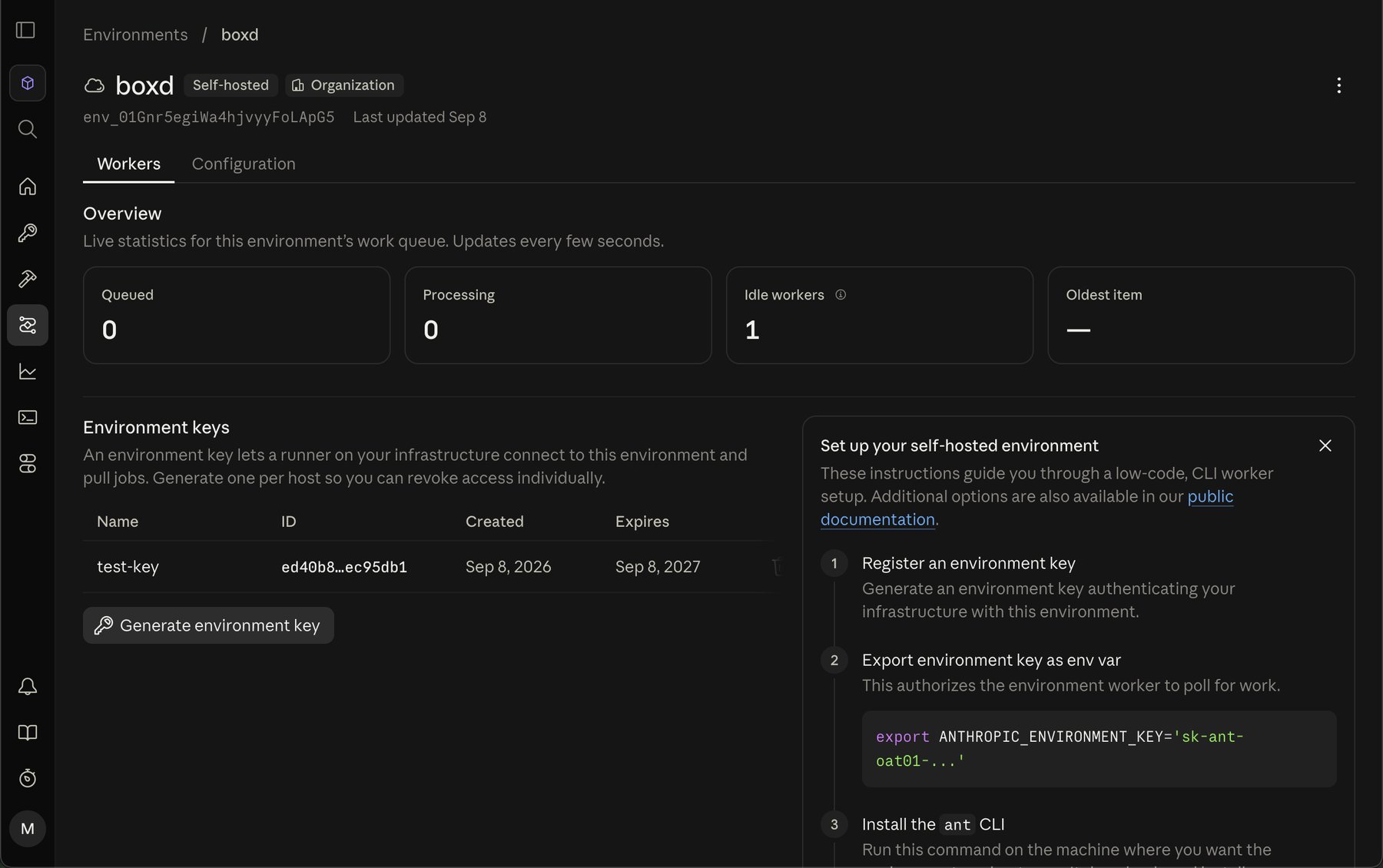 Keep your org API key off any machine that runs tool calls. The environment key is enough for the worker, and it grants nothing beyond this environment.
## Quickstart, one machine
The fastest working setup is a single machine polling for work. Create it, install the worker, and give it a `/workspace` to operate in:
```bash theme={"theme":"github-dark"}
boxd machine new claude-worker --auto-hibernate-timeout=0
boxd machine exec claude-worker -- '
ARCH=$(uname -m | sed -e "s/x86_64/amd64/" -e "s/aarch64/arm64/")
curl -fsSL "https://github.com/anthropics/anthropic-cli/releases/download/v1.31.0/ant_1.31.0_linux_${ARCH}.tar.gz" \
| sudo tar -xz -C /usr/local/bin ant
sudo mkdir -p /workspace && sudo chown boxd:boxd /workspace
'
```
Start the worker with the environment key passed in on the command:
```bash theme={"theme":"github-dark"}
boxd machine exec claude-worker \
-e ANTHROPIC_ENVIRONMENT_KEY="sk-ant-oat01-..." \
-e ANTHROPIC_ENVIRONMENT_ID="$ENV_ID" \
-- 'nohup ant beta:worker poll --workdir /workspace > ~/worker.log 2>&1 &'
```
Confirm Anthropic can see it:
```bash theme={"theme":"github-dark"}
ant beta:environments:work stats --environment-id "$ENV_ID"
# workers_polling: 1
```
Now start a session from anywhere:
```bash theme={"theme":"github-dark"}
SID=$(ant beta:sessions create --agent "$AGENT_ID" --environment-id "$ENV_ID" --transform id -r)
ant beta:sessions:events send --session-id "$SID" \
--event '{type: user.message, content: [{type: text, text: "create /workspace/hello.txt with a greeting, then read it back"}]}'
ant beta:sessions:events list --session-id "$SID" --format jsonl
```
The file appears on the machine, and the agent's tool calls show up in `~/worker.log`.
Set `--auto-hibernate-timeout=0` on any machine running a worker, and `--auto-suspend-timeout=0` if your org turns auto-suspend on by default. The idle timers watch inbound traffic, and the worker's poll is outbound, so a busy worker still looks idle. See [Suspend, resume, and hibernate](/guides/suspend-resume).
## One machine per session
A single machine means every session shares one filesystem. Giving each session a machine of its own buys three things. Sessions cannot see each other's files. A session that wrecks its machine wrecks only its own. And each machine sleeps on its own schedule.
The shape is an orchestrator that turns each queued work item into a machine.
### Build the image once
Every session machine boots from a [snapshot](/guides/snapshots), so the worker and your toolchain are already in place:
```bash theme={"theme":"github-dark"}
boxd machine new claude-worker-builder
boxd machine exec claude-worker-builder -- '
ARCH=$(uname -m | sed -e "s/x86_64/amd64/" -e "s/aarch64/arm64/")
curl -fsSL "https://github.com/anthropics/anthropic-cli/releases/download/v1.31.0/ant_1.31.0_linux_${ARCH}.tar.gz" \
| sudo tar -xz -C /usr/local/bin ant
sudo mkdir -p /workspace && sudo chown boxd:boxd /workspace
'
# Add whatever every session should start with: a repo clone, a toolchain, model weights.
boxd snapshots save claude-worker-builder claude-worker
boxd machine remove claude-worker-builder -y
```
A machine created from this snapshot is ready in milliseconds, memory and all.
### Run the orchestrator
The orchestrator receives Anthropic's `session.status_run_started` webhook, drains the work queue, and runs each session's worker in that session's own machine. When the session ends, it deletes the machine. Put it on its own boxd machine, where the SDK authenticates automatically with no key to manage.
```python theme={"theme":"github-dark"}
import asyncio, os, re
import anthropic
from boxd import AsyncBoxd, NotFoundError
from fastapi import FastAPI, Request, Response
ENVIRONMENT_ID = os.environ["ANTHROPIC_ENVIRONMENT_ID"]
ENVIRONMENT_KEY = os.environ["ANTHROPIC_ENVIRONMENT_KEY"]
client = anthropic.AsyncAnthropic(auth_token=ENVIRONMENT_KEY)
boxd = AsyncBoxd()
app = FastAPI()
inflight: set[asyncio.Task] = set()
def machine_name(session_id: str) -> str:
return "agent-" + re.sub(r"[^a-z0-9-]", "-", session_id.lower())
async def ensure_machine(session_id: str) -> str:
name = machine_name(session_id)
try:
machine = await boxd.machines.get(name)
except NotFoundError:
machine = await boxd.machines.create(name, from_snapshot="claude-worker", isolated=True)
await boxd.machines.set_auto_hibernate_timeout(machine.id, 0)
if machine.status == "suspended":
await boxd.machines.resume(machine.id)
await boxd.machines.wait_until_ready(machine.id)
return machine.id
async def run_session(work) -> None:
machine_id = await ensure_machine(work.data.id)
env = {
"ANTHROPIC_SESSION_ID": work.data.id,
"ANTHROPIC_WORK_ID": work.id,
"ANTHROPIC_ENVIRONMENT_ID": ENVIRONMENT_ID,
"ANTHROPIC_ENVIRONMENT_KEY": ENVIRONMENT_KEY,
}
# Returns when the worker exits, a minute after the session goes idle.
await boxd.machines.exec(
machine_id, "ant beta:worker run --workdir /workspace",
env=env, timeout=24 * 60 * 60,
)
await boxd.machines.pause(machine_id)
async def remove_machine(session_id: str) -> None:
try:
await boxd.machines.delete(machine_name(session_id))
except NotFoundError:
pass
async def drain() -> None:
async for work in client.beta.environments.work.poller(
environment_id=ENVIRONMENT_ID, environment_key=ENVIRONMENT_KEY,
block_ms=None, reclaim_older_than_ms=2000, drain=True, auto_stop=False,
):
if work.data.type == "session":
task = asyncio.create_task(run_session(work))
inflight.add(task)
task.add_done_callback(inflight.discard)
@app.post("/webhook")
async def webhook(request: Request) -> Response:
try:
event = client.beta.webhooks.unwrap(
(await request.body()).decode(), headers=dict(request.headers)
)
except Exception:
return Response("invalid signature", status_code=401)
if event.data.type == "session.status_run_started":
task = asyncio.create_task(drain()) # ack now, the session outlives the delivery
elif event.data.type in ("session.status_terminated", "session.deleted"):
task = asyncio.create_task(remove_machine(event.data.id))
else:
return Response(status_code=204)
inflight.add(task)
task.add_done_callback(inflight.discard)
return Response(status_code=204)
```
```typescript theme={"theme":"github-dark"}
import http from "node:http";
import Anthropic from "@anthropic-ai/sdk";
import { Boxd, NotFoundError } from "@boxd-sh/sdk";
const ENVIRONMENT_ID = process.env.ANTHROPIC_ENVIRONMENT_ID!;
const ENVIRONMENT_KEY = process.env.ANTHROPIC_ENVIRONMENT_KEY!;
const client = new Anthropic({ authToken: ENVIRONMENT_KEY });
const boxd = new Boxd();
const machineName = (sessionId: string) =>
"agent-" + sessionId.toLowerCase().replace(/[^a-z0-9-]/g, "-");
async function ensureMachine(sessionId: string): Promise {
const name = machineName(sessionId);
let machine;
try {
machine = await boxd.machines.get(name);
} catch (e) {
if (!(e instanceof NotFoundError)) throw e;
machine = await boxd.machines.create({
name, fromSnapshot: "claude-worker", isolated: true,
});
await boxd.machines.setAutoHibernateTimeout(machine.id, 0);
}
if (machine.status === "suspended") await boxd.machines.resume(machine.id);
await boxd.machines.waitUntilReady(machine.id);
return machine.id;
}
async function runSession(work: { id: string; data: { id: string } }) {
const machineId = await ensureMachine(work.data.id);
// Returns when the worker exits, a minute after the session goes idle.
await boxd.machines.exec(machineId, {
command: "ant beta:worker run --workdir /workspace",
env: {
ANTHROPIC_SESSION_ID: work.data.id,
ANTHROPIC_WORK_ID: work.id,
ANTHROPIC_ENVIRONMENT_ID: ENVIRONMENT_ID,
ANTHROPIC_ENVIRONMENT_KEY: ENVIRONMENT_KEY,
},
timeout: 24 * 60 * 60 * 1000,
});
await boxd.machines.pause(machineId);
}
async function removeMachine(sessionId: string) {
try {
await boxd.machines.delete(machineName(sessionId));
} catch (e) {
if (!(e instanceof NotFoundError)) throw e;
}
}
async function drain() {
for await (const work of client.beta.environments.work.poller({
environmentId: ENVIRONMENT_ID, environmentKey: ENVIRONMENT_KEY,
blockMs: null, reclaimOlderThanMs: 2000, drain: true, autoStop: false,
})) {
if (work.data.type === "session") void runSession(work).catch(console.error);
}
}
http.createServer(async (req, res) => {
const body = await new Promise((resolve) => {
let d = ""; req.on("data", (c) => (d += c)); req.on("end", () => resolve(d));
});
try {
const event = client.beta.webhooks.unwrap(body, {
headers: req.headers as Record,
});
if (event.data.type === "session.status_run_started") {
void drain().catch(console.error); // ack now, the session outlives the delivery
} else if (event.data.type === "session.status_terminated" || event.data.type === "session.deleted") {
void removeMachine(event.data.id).catch(console.error);
}
} catch {
res.writeHead(401); return res.end("invalid signature");
}
res.writeHead(204); res.end();
}).listen(8000, "0.0.0.0");
```
Create the orchestrator machine first, so the URL you register resolves:
```bash theme={"theme":"github-dark"}
boxd machine new cma-orchestrator --auto-hibernate-timeout=0
```
Register `https://cma-orchestrator.boxd.sh/webhook` in the Console under **Manage**, then **Webhooks**, subscribed to `session.status_run_started`, `session.status_terminated`, and `session.deleted`. Put the `whsec_` secret it shows next to the environment id and key, in a `.env` beside your `orchestrator.py` or `orchestrator.ts`:
```bash theme={"theme":"github-dark"}
ANTHROPIC_ENVIRONMENT_ID=env_...
ANTHROPIC_ENVIRONMENT_KEY=sk-ant-oat01-...
ANTHROPIC_WEBHOOK_SIGNING_KEY=whsec_...
```
Then deploy. The machine already has an HTTPS domain, so there is no TLS to arrange:
```bash Python theme={"theme":"github-dark"}
boxd machine exec cma-orchestrator -- 'mkdir -p ~/cma && cd ~/cma && uv venv && uv pip install "anthropic[webhooks]" boxd fastapi uvicorn'
boxd machine cp orchestrator.py cma-orchestrator:cma/orchestrator.py
boxd env push cma-orchestrator --file .env --dest '~/cma/.env'
boxd machine exec cma-orchestrator -- 'cd ~/cma && set -a && . ./.env && set +a && nohup .venv/bin/uvicorn orchestrator:app --host 0.0.0.0 --port 8000 > ~/orchestrator.log 2>&1 &'
```
```bash TypeScript theme={"theme":"github-dark"}
boxd machine exec cma-orchestrator -- 'mkdir -p ~/cma && cd ~/cma && npm init -y >/dev/null && npm install @anthropic-ai/sdk @boxd-sh/sdk tsx'
boxd machine cp orchestrator.ts cma-orchestrator:cma/orchestrator.ts
boxd env push cma-orchestrator --file .env --dest '~/cma/.env'
boxd machine exec cma-orchestrator -- 'cd ~/cma && set -a && . ./.env && set +a && nohup npx tsx orchestrator.ts > ~/orchestrator.log 2>&1 &'
```
A signed delivery gets a `204` in `~/orchestrator.log`. Anything unsigned gets a `401`.
### Resume instead of recreate
The worker exits a minute after the session goes idle, and the orchestrator pauses the machine. That takes it to `standby`, where it holds its memory and running processes and costs near nothing.
When the next turn arrives, the same session resolves to the same machine name, and resuming takes under a millisecond. The agent finds `/workspace` as it left it, dependencies installed and caches warm. For a long conversation with gaps between turns, that is the difference between re-cloning a repo every time and picking up mid-thought.
The machine is deleted when the session terminates or is deleted, so its state lives exactly as long as the session does.
## Without an SDK
Anthropic's poller can hand each work item to a script instead of running the tool loop itself. That script is the whole orchestrator:
```bash theme={"theme":"github-dark"}
#!/bin/bash
# spawn.sh, one boxd machine per session.
# The poller sets ANTHROPIC_{SESSION,WORK,ENVIRONMENT}_ID and ANTHROPIC_ENVIRONMENT_KEY,
# and writes the work item JSON to stdin.
set -euo pipefail
NAME="agent-$(echo "$ANTHROPIC_SESSION_ID" | tr '[:upper:]_' '[:lower:]-')"
if ! boxd machine get "$NAME" --json >/dev/null 2>&1; then
boxd machine new "$NAME" --from-snapshot claude-worker --isolated --auto-hibernate-timeout=0 --json >/dev/null
fi
case "$(boxd machine get "$NAME" --json | jq -r .status)" in
standby) boxd machine resume "$NAME" --json >/dev/null ;;
hibernated) boxd machine wake "$NAME" --json >/dev/null ;;
esac
# `machine new` returns once the machine is scheduled. Wait until exec works.
until boxd machine exec "$NAME" -- true >/dev/null 2>&1; do sleep 1; done
boxd machine exec "$NAME" \
-e ANTHROPIC_SESSION_ID="$ANTHROPIC_SESSION_ID" \
-e ANTHROPIC_WORK_ID="$ANTHROPIC_WORK_ID" \
-e ANTHROPIC_ENVIRONMENT_ID="$ANTHROPIC_ENVIRONMENT_ID" \
-e ANTHROPIC_ENVIRONMENT_KEY="$ANTHROPIC_ENVIRONMENT_KEY" \
-- 'ant beta:worker run --workdir /workspace'
boxd machine pause "$NAME" --json >/dev/null
```
```bash theme={"theme":"github-dark"}
ant beta:worker poll --on-work ./spawn.sh
```
The same lifecycle as the orchestrator above, in thirty lines, with no webhook to register. One difference. The poll model has no session-end event, so machines are paused but never deleted. Sweep the `agent-` machines of finished sessions yourself.
Run this poller on your laptop or a server, where the `boxd` CLI is signed in as you. The CLI that ships inside a machine authenticates as that machine, and a machine cannot reach an `--isolated` peer, so `exec` fails with "not found or not accessible". The SDK does not have this restriction, which is why the orchestrator above runs happily on a boxd machine.
## Credentials the agent can use but never read
Self-hosted environments do not support Anthropic's vault environment-variable credentials, because the egress is yours. boxd covers the same ground at its own edge, and more tightly.
Bind a secret to the hosts it may be sent to, and the machine only ever holds a placeholder:
```typescript TypeScript theme={"theme":"github-dark"}
await boxd.secrets.set("STRIPE_KEY", "sk_live_...", {
scope: "all",
domains: ["api.stripe.com"],
});
```
```python Python theme={"theme":"github-dark"}
boxd.secrets.set("STRIPE_KEY", "sk_live_...", scope="all", domains=["api.stripe.com"])
```
The real value is substituted into requests to `api.stripe.com` on the way out. Inside the machine, `env`, shell history, and the agent's own transcript contain nothing but an opaque `bxds_…` string. A prompt injection that talks the agent into printing every secret it can find gets placeholders. Set it once at the organization level and every session machine carries it. An isolated machine receives account-level variables through `exec` sessions, and `exec` is exactly how the orchestrator starts the worker.
Pair it with a per-machine egress allowlist so the machine can only reach the hosts you name. A machine restored from a snapshot starts unrestricted, so set the list in `ensure_machine` right after `create`:
```typescript TypeScript theme={"theme":"github-dark"}
await boxd.machines.setEgressAllow(machine.id, ["api.stripe.com", "api.github.com"]);
```
```python Python theme={"theme":"github-dark"}
await boxd.machines.set_egress_allow(machine.id, ["api.stripe.com", "api.github.com"])
```
Both controls are enforced outside the machine, so code inside cannot lift them. See [Env vars & secrets](/guides/env-secrets) and [Egress control](/guides/egress).
## Files and repositories
Self-hosted environments reject `file` and `github_repository` session resources, since Anthropic has no container to mount them into. Two boxd answers, depending on whether the data is shared or per-session:
**Shared across every session.** Bake it into the snapshot. Clone the repo, install the dependencies, warm the caches, then save. Every session starts with it and pays nothing at boot.
**Per session.** Copy it in from the orchestrator before starting the worker, using the session's own metadata to decide what. Your app sets the metadata when it creates the session, with its org API key:
```python theme={"theme":"github-dark"}
session = await client.beta.sessions.create(
agent=AGENT_ID, environment_id=ENV_ID,
metadata={"repo": "github.com/acme/api", "branch": "fix-123"},
)
```
The orchestrator reads it back with the environment key, which can retrieve the sessions on its environment:
```python theme={"theme":"github-dark"}
meta = (await client.beta.sessions.retrieve(work.data.id)).metadata
await boxd.machines.exec(machine_id, f"git clone -b {meta['branch']} https://{meta['repo']} /workspace/repo")
```
Session outputs work the same way in reverse. The agent writes to `/workspace`, and the orchestrator reads the file out with [`machines.files.download`](/reference/python-sdk#files) once the turn ends.
## Parallel exploration
A [fork](/guides/fork) copies a running machine's disk, memory, and processes in under 200ms. Fork a session machine several times mid-task and each copy continues from the same live state, so an agent can try several approaches at once and keep the one that works:
```bash theme={"theme":"github-dark"}
boxd machine fork agent-sesn-01abc attempt-1
boxd machine fork agent-sesn-01abc attempt-2
boxd machine fork agent-sesn-01abc attempt-3
```
Expose it to the agent as a small CLI it can call through `bash`, or drive it from the orchestrator. [Agent swarm intelligence](/use-cases/agent-swarm-intelligence) covers the fan-out and merge pattern in full.
## What you own
| | Anthropic | boxd |
| ------------------------------------- | --------- | ---- |
| Model, agent loop, context management | ✅ | |
| Session state and event history | ✅ | |
| `web_search` and `web_fetch` | ✅ | |
| Tool execution, filesystem, processes | | ✅ |
| Network egress from the sandbox | | ✅ |
| Machine lifecycle and isolation | | ✅ |
Tool inputs and results still travel to Anthropic, because the model has to see them. Everything else stays on your machine.
## FAQ
No. The worker polls outbound over HTTPS. Only the orchestrator needs an inbound URL, and only if you choose the webhook path over polling. Every machine already has one at `name.boxd.sh`.
The session stalls at `requires_action`, waiting for a tool result that will never arrive, and rejects new messages until you send `user.interrupt`. That abandons the dead call and returns the work item to the queue. The next message starts a turn, the webhook fires, and the orchestrator boots a fresh machine from the snapshot under the same name, since the old one is gone. A polling worker claims the returned item on its own.
Yes, that is the quickstart. One `ant beta:worker poll` handles sessions one after another in a single `/workspace`. It suits a trusted single-tenant workload. Give each session its own machine when the sessions should not see each other's files.
They need the SDK's `EnvironmentWorker`, which downloads each store to `/mnt/memory` and syncs it back. The `ant` CLI worker used here does not mount them. Swap the in-machine worker for a small Python or TypeScript entrypoint calling `handle_item()` if you need them, and see [Anthropic's notes on memory stores](https://platform.claude.com/docs/en/managed-agents/self-hosted-sandboxes).
Whatever you set in `agent.yaml`. The environment has nothing to do with model choice, so a self-hosted sandbox costs the same per token as a cloud one.
Keep your org API key off any machine that runs tool calls. The environment key is enough for the worker, and it grants nothing beyond this environment.
## Quickstart, one machine
The fastest working setup is a single machine polling for work. Create it, install the worker, and give it a `/workspace` to operate in:
```bash theme={"theme":"github-dark"}
boxd machine new claude-worker --auto-hibernate-timeout=0
boxd machine exec claude-worker -- '
ARCH=$(uname -m | sed -e "s/x86_64/amd64/" -e "s/aarch64/arm64/")
curl -fsSL "https://github.com/anthropics/anthropic-cli/releases/download/v1.31.0/ant_1.31.0_linux_${ARCH}.tar.gz" \
| sudo tar -xz -C /usr/local/bin ant
sudo mkdir -p /workspace && sudo chown boxd:boxd /workspace
'
```
Start the worker with the environment key passed in on the command:
```bash theme={"theme":"github-dark"}
boxd machine exec claude-worker \
-e ANTHROPIC_ENVIRONMENT_KEY="sk-ant-oat01-..." \
-e ANTHROPIC_ENVIRONMENT_ID="$ENV_ID" \
-- 'nohup ant beta:worker poll --workdir /workspace > ~/worker.log 2>&1 &'
```
Confirm Anthropic can see it:
```bash theme={"theme":"github-dark"}
ant beta:environments:work stats --environment-id "$ENV_ID"
# workers_polling: 1
```
Now start a session from anywhere:
```bash theme={"theme":"github-dark"}
SID=$(ant beta:sessions create --agent "$AGENT_ID" --environment-id "$ENV_ID" --transform id -r)
ant beta:sessions:events send --session-id "$SID" \
--event '{type: user.message, content: [{type: text, text: "create /workspace/hello.txt with a greeting, then read it back"}]}'
ant beta:sessions:events list --session-id "$SID" --format jsonl
```
The file appears on the machine, and the agent's tool calls show up in `~/worker.log`.
Set `--auto-hibernate-timeout=0` on any machine running a worker, and `--auto-suspend-timeout=0` if your org turns auto-suspend on by default. The idle timers watch inbound traffic, and the worker's poll is outbound, so a busy worker still looks idle. See [Suspend, resume, and hibernate](/guides/suspend-resume).
## One machine per session
A single machine means every session shares one filesystem. Giving each session a machine of its own buys three things. Sessions cannot see each other's files. A session that wrecks its machine wrecks only its own. And each machine sleeps on its own schedule.
The shape is an orchestrator that turns each queued work item into a machine.
### Build the image once
Every session machine boots from a [snapshot](/guides/snapshots), so the worker and your toolchain are already in place:
```bash theme={"theme":"github-dark"}
boxd machine new claude-worker-builder
boxd machine exec claude-worker-builder -- '
ARCH=$(uname -m | sed -e "s/x86_64/amd64/" -e "s/aarch64/arm64/")
curl -fsSL "https://github.com/anthropics/anthropic-cli/releases/download/v1.31.0/ant_1.31.0_linux_${ARCH}.tar.gz" \
| sudo tar -xz -C /usr/local/bin ant
sudo mkdir -p /workspace && sudo chown boxd:boxd /workspace
'
# Add whatever every session should start with: a repo clone, a toolchain, model weights.
boxd snapshots save claude-worker-builder claude-worker
boxd machine remove claude-worker-builder -y
```
A machine created from this snapshot is ready in milliseconds, memory and all.
### Run the orchestrator
The orchestrator receives Anthropic's `session.status_run_started` webhook, drains the work queue, and runs each session's worker in that session's own machine. When the session ends, it deletes the machine. Put it on its own boxd machine, where the SDK authenticates automatically with no key to manage.
```python theme={"theme":"github-dark"}
import asyncio, os, re
import anthropic
from boxd import AsyncBoxd, NotFoundError
from fastapi import FastAPI, Request, Response
ENVIRONMENT_ID = os.environ["ANTHROPIC_ENVIRONMENT_ID"]
ENVIRONMENT_KEY = os.environ["ANTHROPIC_ENVIRONMENT_KEY"]
client = anthropic.AsyncAnthropic(auth_token=ENVIRONMENT_KEY)
boxd = AsyncBoxd()
app = FastAPI()
inflight: set[asyncio.Task] = set()
def machine_name(session_id: str) -> str:
return "agent-" + re.sub(r"[^a-z0-9-]", "-", session_id.lower())
async def ensure_machine(session_id: str) -> str:
name = machine_name(session_id)
try:
machine = await boxd.machines.get(name)
except NotFoundError:
machine = await boxd.machines.create(name, from_snapshot="claude-worker", isolated=True)
await boxd.machines.set_auto_hibernate_timeout(machine.id, 0)
if machine.status == "suspended":
await boxd.machines.resume(machine.id)
await boxd.machines.wait_until_ready(machine.id)
return machine.id
async def run_session(work) -> None:
machine_id = await ensure_machine(work.data.id)
env = {
"ANTHROPIC_SESSION_ID": work.data.id,
"ANTHROPIC_WORK_ID": work.id,
"ANTHROPIC_ENVIRONMENT_ID": ENVIRONMENT_ID,
"ANTHROPIC_ENVIRONMENT_KEY": ENVIRONMENT_KEY,
}
# Returns when the worker exits, a minute after the session goes idle.
await boxd.machines.exec(
machine_id, "ant beta:worker run --workdir /workspace",
env=env, timeout=24 * 60 * 60,
)
await boxd.machines.pause(machine_id)
async def remove_machine(session_id: str) -> None:
try:
await boxd.machines.delete(machine_name(session_id))
except NotFoundError:
pass
async def drain() -> None:
async for work in client.beta.environments.work.poller(
environment_id=ENVIRONMENT_ID, environment_key=ENVIRONMENT_KEY,
block_ms=None, reclaim_older_than_ms=2000, drain=True, auto_stop=False,
):
if work.data.type == "session":
task = asyncio.create_task(run_session(work))
inflight.add(task)
task.add_done_callback(inflight.discard)
@app.post("/webhook")
async def webhook(request: Request) -> Response:
try:
event = client.beta.webhooks.unwrap(
(await request.body()).decode(), headers=dict(request.headers)
)
except Exception:
return Response("invalid signature", status_code=401)
if event.data.type == "session.status_run_started":
task = asyncio.create_task(drain()) # ack now, the session outlives the delivery
elif event.data.type in ("session.status_terminated", "session.deleted"):
task = asyncio.create_task(remove_machine(event.data.id))
else:
return Response(status_code=204)
inflight.add(task)
task.add_done_callback(inflight.discard)
return Response(status_code=204)
```
```typescript theme={"theme":"github-dark"}
import http from "node:http";
import Anthropic from "@anthropic-ai/sdk";
import { Boxd, NotFoundError } from "@boxd-sh/sdk";
const ENVIRONMENT_ID = process.env.ANTHROPIC_ENVIRONMENT_ID!;
const ENVIRONMENT_KEY = process.env.ANTHROPIC_ENVIRONMENT_KEY!;
const client = new Anthropic({ authToken: ENVIRONMENT_KEY });
const boxd = new Boxd();
const machineName = (sessionId: string) =>
"agent-" + sessionId.toLowerCase().replace(/[^a-z0-9-]/g, "-");
async function ensureMachine(sessionId: string): Promise {
const name = machineName(sessionId);
let machine;
try {
machine = await boxd.machines.get(name);
} catch (e) {
if (!(e instanceof NotFoundError)) throw e;
machine = await boxd.machines.create({
name, fromSnapshot: "claude-worker", isolated: true,
});
await boxd.machines.setAutoHibernateTimeout(machine.id, 0);
}
if (machine.status === "suspended") await boxd.machines.resume(machine.id);
await boxd.machines.waitUntilReady(machine.id);
return machine.id;
}
async function runSession(work: { id: string; data: { id: string } }) {
const machineId = await ensureMachine(work.data.id);
// Returns when the worker exits, a minute after the session goes idle.
await boxd.machines.exec(machineId, {
command: "ant beta:worker run --workdir /workspace",
env: {
ANTHROPIC_SESSION_ID: work.data.id,
ANTHROPIC_WORK_ID: work.id,
ANTHROPIC_ENVIRONMENT_ID: ENVIRONMENT_ID,
ANTHROPIC_ENVIRONMENT_KEY: ENVIRONMENT_KEY,
},
timeout: 24 * 60 * 60 * 1000,
});
await boxd.machines.pause(machineId);
}
async function removeMachine(sessionId: string) {
try {
await boxd.machines.delete(machineName(sessionId));
} catch (e) {
if (!(e instanceof NotFoundError)) throw e;
}
}
async function drain() {
for await (const work of client.beta.environments.work.poller({
environmentId: ENVIRONMENT_ID, environmentKey: ENVIRONMENT_KEY,
blockMs: null, reclaimOlderThanMs: 2000, drain: true, autoStop: false,
})) {
if (work.data.type === "session") void runSession(work).catch(console.error);
}
}
http.createServer(async (req, res) => {
const body = await new Promise((resolve) => {
let d = ""; req.on("data", (c) => (d += c)); req.on("end", () => resolve(d));
});
try {
const event = client.beta.webhooks.unwrap(body, {
headers: req.headers as Record,
});
if (event.data.type === "session.status_run_started") {
void drain().catch(console.error); // ack now, the session outlives the delivery
} else if (event.data.type === "session.status_terminated" || event.data.type === "session.deleted") {
void removeMachine(event.data.id).catch(console.error);
}
} catch {
res.writeHead(401); return res.end("invalid signature");
}
res.writeHead(204); res.end();
}).listen(8000, "0.0.0.0");
```
Create the orchestrator machine first, so the URL you register resolves:
```bash theme={"theme":"github-dark"}
boxd machine new cma-orchestrator --auto-hibernate-timeout=0
```
Register `https://cma-orchestrator.boxd.sh/webhook` in the Console under **Manage**, then **Webhooks**, subscribed to `session.status_run_started`, `session.status_terminated`, and `session.deleted`. Put the `whsec_` secret it shows next to the environment id and key, in a `.env` beside your `orchestrator.py` or `orchestrator.ts`:
```bash theme={"theme":"github-dark"}
ANTHROPIC_ENVIRONMENT_ID=env_...
ANTHROPIC_ENVIRONMENT_KEY=sk-ant-oat01-...
ANTHROPIC_WEBHOOK_SIGNING_KEY=whsec_...
```
Then deploy. The machine already has an HTTPS domain, so there is no TLS to arrange:
```bash Python theme={"theme":"github-dark"}
boxd machine exec cma-orchestrator -- 'mkdir -p ~/cma && cd ~/cma && uv venv && uv pip install "anthropic[webhooks]" boxd fastapi uvicorn'
boxd machine cp orchestrator.py cma-orchestrator:cma/orchestrator.py
boxd env push cma-orchestrator --file .env --dest '~/cma/.env'
boxd machine exec cma-orchestrator -- 'cd ~/cma && set -a && . ./.env && set +a && nohup .venv/bin/uvicorn orchestrator:app --host 0.0.0.0 --port 8000 > ~/orchestrator.log 2>&1 &'
```
```bash TypeScript theme={"theme":"github-dark"}
boxd machine exec cma-orchestrator -- 'mkdir -p ~/cma && cd ~/cma && npm init -y >/dev/null && npm install @anthropic-ai/sdk @boxd-sh/sdk tsx'
boxd machine cp orchestrator.ts cma-orchestrator:cma/orchestrator.ts
boxd env push cma-orchestrator --file .env --dest '~/cma/.env'
boxd machine exec cma-orchestrator -- 'cd ~/cma && set -a && . ./.env && set +a && nohup npx tsx orchestrator.ts > ~/orchestrator.log 2>&1 &'
```
A signed delivery gets a `204` in `~/orchestrator.log`. Anything unsigned gets a `401`.
### Resume instead of recreate
The worker exits a minute after the session goes idle, and the orchestrator pauses the machine. That takes it to `standby`, where it holds its memory and running processes and costs near nothing.
When the next turn arrives, the same session resolves to the same machine name, and resuming takes under a millisecond. The agent finds `/workspace` as it left it, dependencies installed and caches warm. For a long conversation with gaps between turns, that is the difference between re-cloning a repo every time and picking up mid-thought.
The machine is deleted when the session terminates or is deleted, so its state lives exactly as long as the session does.
## Without an SDK
Anthropic's poller can hand each work item to a script instead of running the tool loop itself. That script is the whole orchestrator:
```bash theme={"theme":"github-dark"}
#!/bin/bash
# spawn.sh, one boxd machine per session.
# The poller sets ANTHROPIC_{SESSION,WORK,ENVIRONMENT}_ID and ANTHROPIC_ENVIRONMENT_KEY,
# and writes the work item JSON to stdin.
set -euo pipefail
NAME="agent-$(echo "$ANTHROPIC_SESSION_ID" | tr '[:upper:]_' '[:lower:]-')"
if ! boxd machine get "$NAME" --json >/dev/null 2>&1; then
boxd machine new "$NAME" --from-snapshot claude-worker --isolated --auto-hibernate-timeout=0 --json >/dev/null
fi
case "$(boxd machine get "$NAME" --json | jq -r .status)" in
standby) boxd machine resume "$NAME" --json >/dev/null ;;
hibernated) boxd machine wake "$NAME" --json >/dev/null ;;
esac
# `machine new` returns once the machine is scheduled. Wait until exec works.
until boxd machine exec "$NAME" -- true >/dev/null 2>&1; do sleep 1; done
boxd machine exec "$NAME" \
-e ANTHROPIC_SESSION_ID="$ANTHROPIC_SESSION_ID" \
-e ANTHROPIC_WORK_ID="$ANTHROPIC_WORK_ID" \
-e ANTHROPIC_ENVIRONMENT_ID="$ANTHROPIC_ENVIRONMENT_ID" \
-e ANTHROPIC_ENVIRONMENT_KEY="$ANTHROPIC_ENVIRONMENT_KEY" \
-- 'ant beta:worker run --workdir /workspace'
boxd machine pause "$NAME" --json >/dev/null
```
```bash theme={"theme":"github-dark"}
ant beta:worker poll --on-work ./spawn.sh
```
The same lifecycle as the orchestrator above, in thirty lines, with no webhook to register. One difference. The poll model has no session-end event, so machines are paused but never deleted. Sweep the `agent-` machines of finished sessions yourself.
Run this poller on your laptop or a server, where the `boxd` CLI is signed in as you. The CLI that ships inside a machine authenticates as that machine, and a machine cannot reach an `--isolated` peer, so `exec` fails with "not found or not accessible". The SDK does not have this restriction, which is why the orchestrator above runs happily on a boxd machine.
## Credentials the agent can use but never read
Self-hosted environments do not support Anthropic's vault environment-variable credentials, because the egress is yours. boxd covers the same ground at its own edge, and more tightly.
Bind a secret to the hosts it may be sent to, and the machine only ever holds a placeholder:
```typescript TypeScript theme={"theme":"github-dark"}
await boxd.secrets.set("STRIPE_KEY", "sk_live_...", {
scope: "all",
domains: ["api.stripe.com"],
});
```
```python Python theme={"theme":"github-dark"}
boxd.secrets.set("STRIPE_KEY", "sk_live_...", scope="all", domains=["api.stripe.com"])
```
The real value is substituted into requests to `api.stripe.com` on the way out. Inside the machine, `env`, shell history, and the agent's own transcript contain nothing but an opaque `bxds_…` string. A prompt injection that talks the agent into printing every secret it can find gets placeholders. Set it once at the organization level and every session machine carries it. An isolated machine receives account-level variables through `exec` sessions, and `exec` is exactly how the orchestrator starts the worker.
Pair it with a per-machine egress allowlist so the machine can only reach the hosts you name. A machine restored from a snapshot starts unrestricted, so set the list in `ensure_machine` right after `create`:
```typescript TypeScript theme={"theme":"github-dark"}
await boxd.machines.setEgressAllow(machine.id, ["api.stripe.com", "api.github.com"]);
```
```python Python theme={"theme":"github-dark"}
await boxd.machines.set_egress_allow(machine.id, ["api.stripe.com", "api.github.com"])
```
Both controls are enforced outside the machine, so code inside cannot lift them. See [Env vars & secrets](/guides/env-secrets) and [Egress control](/guides/egress).
## Files and repositories
Self-hosted environments reject `file` and `github_repository` session resources, since Anthropic has no container to mount them into. Two boxd answers, depending on whether the data is shared or per-session:
**Shared across every session.** Bake it into the snapshot. Clone the repo, install the dependencies, warm the caches, then save. Every session starts with it and pays nothing at boot.
**Per session.** Copy it in from the orchestrator before starting the worker, using the session's own metadata to decide what. Your app sets the metadata when it creates the session, with its org API key:
```python theme={"theme":"github-dark"}
session = await client.beta.sessions.create(
agent=AGENT_ID, environment_id=ENV_ID,
metadata={"repo": "github.com/acme/api", "branch": "fix-123"},
)
```
The orchestrator reads it back with the environment key, which can retrieve the sessions on its environment:
```python theme={"theme":"github-dark"}
meta = (await client.beta.sessions.retrieve(work.data.id)).metadata
await boxd.machines.exec(machine_id, f"git clone -b {meta['branch']} https://{meta['repo']} /workspace/repo")
```
Session outputs work the same way in reverse. The agent writes to `/workspace`, and the orchestrator reads the file out with [`machines.files.download`](/reference/python-sdk#files) once the turn ends.
## Parallel exploration
A [fork](/guides/fork) copies a running machine's disk, memory, and processes in under 200ms. Fork a session machine several times mid-task and each copy continues from the same live state, so an agent can try several approaches at once and keep the one that works:
```bash theme={"theme":"github-dark"}
boxd machine fork agent-sesn-01abc attempt-1
boxd machine fork agent-sesn-01abc attempt-2
boxd machine fork agent-sesn-01abc attempt-3
```
Expose it to the agent as a small CLI it can call through `bash`, or drive it from the orchestrator. [Agent swarm intelligence](/use-cases/agent-swarm-intelligence) covers the fan-out and merge pattern in full.
## What you own
| | Anthropic | boxd |
| ------------------------------------- | --------- | ---- |
| Model, agent loop, context management | ✅ | |
| Session state and event history | ✅ | |
| `web_search` and `web_fetch` | ✅ | |
| Tool execution, filesystem, processes | | ✅ |
| Network egress from the sandbox | | ✅ |
| Machine lifecycle and isolation | | ✅ |
Tool inputs and results still travel to Anthropic, because the model has to see them. Everything else stays on your machine.
## FAQ
No. The worker polls outbound over HTTPS. Only the orchestrator needs an inbound URL, and only if you choose the webhook path over polling. Every machine already has one at `name.boxd.sh`.
The session stalls at `requires_action`, waiting for a tool result that will never arrive, and rejects new messages until you send `user.interrupt`. That abandons the dead call and returns the work item to the queue. The next message starts a turn, the webhook fires, and the orchestrator boots a fresh machine from the snapshot under the same name, since the old one is gone. A polling worker claims the returned item on its own.
Yes, that is the quickstart. One `ant beta:worker poll` handles sessions one after another in a single `/workspace`. It suits a trusted single-tenant workload. Give each session its own machine when the sessions should not see each other's files.
They need the SDK's `EnvironmentWorker`, which downloads each store to `/mnt/memory` and syncs it back. The `ant` CLI worker used here does not mount them. Swap the in-machine worker for a small Python or TypeScript entrypoint calling `handle_item()` if you need them, and see [Anthropic's notes on memory stores](https://platform.claude.com/docs/en/managed-agents/self-hosted-sandboxes).
Whatever you set in `agent.yaml`. The environment has nothing to do with model choice, so a self-hosted sandbox costs the same per token as a cloud one.